


The anti-detect browser market has been running on autopilot for a while. Most newcomers follow the same playbook: copy a competitor’s fingerprint engine, coin a catchy tagline, ship. The result is a sea of near-identical tools that give affiliates almost no reason to switch.
Aurorium is a different story — and we mean that as a genuine compliment, not a hook.
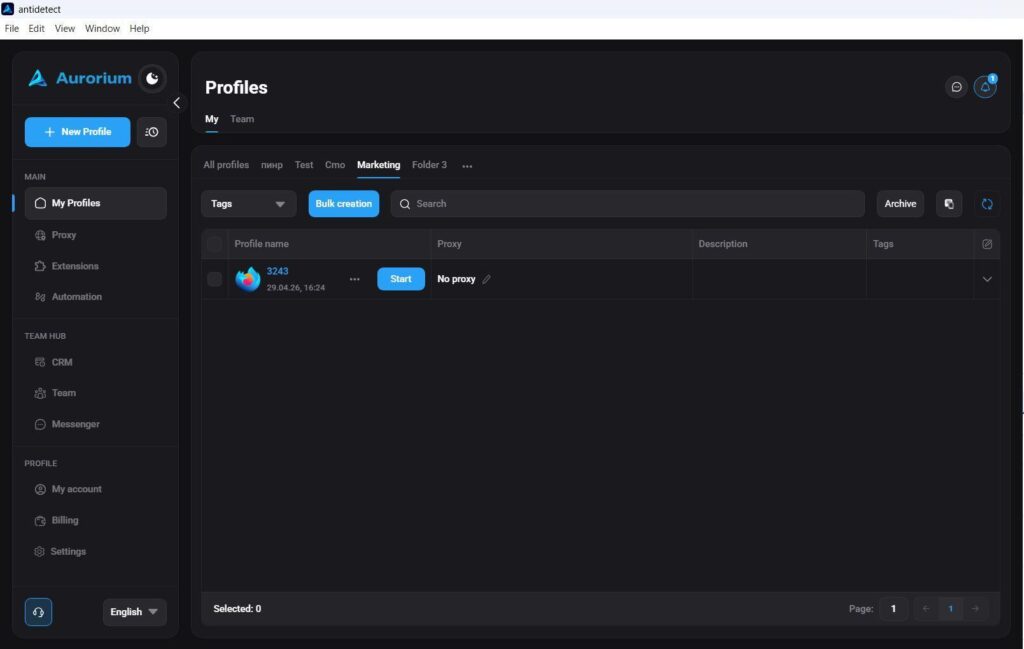
First Touch — Aurorium Browser Overview
At first glance, the product is implemented well. All standard sections are exactly where you’d expect them: proxies, profiles, extensions — no hunting through nested menus.
The dark-themed interface with soft blue branding is easy on the eyes during long sessions. A small thing, but anyone who spends 10+ hours in front of a screen will appreciate it.
Why Another Anti-Detect Browser?
Because the market has a real gap. Anti-fraud systems have evolved well beyond simple bot detection — modern platforms run LLM-based analysis that cross-references device characteristics with the social profile of the user behind the screen.
Think about it: a high-end MacBook paired with a low-income persona, or a cheap Windows laptop tied to a profile of a senior banking professional — both patterns look suspicious to anti-fraud engines. Most anti-detect tools haven’t accounted for this. Aurorium has.
What is RichAds?
Ad network for telegram ads,
high quality push and popunder ads,
domain redirect, native and display traffic source,
buy push ads at $0.005 (CPC), pop ads at $0.5 (CPM),
domain ads costs start from $1.5 (CPM), native ads — from $0.001 (CPC),
ad network offers large volumes of traffic in more than 200 geos from Tier 3 to Tier 1.
AI Fingerprint Generation: The Flagship Feature
Creating a fingerprint is arguably the trickiest part of working with any anti-detect browser. Users either spend a lot of time assembling it manually — or they rely on blind randomization, which is how most tools handle automatic fingerprint generation: algorithms with preset criteria and constraints, no real intelligence behind them.
A fingerprint generated this way doesn’t account for the actual hardware of the user’s device — and that can be critical. The device profile you’re presenting needs to be plausible relative to the machine behind it, otherwise the mismatch itself becomes a signal.
Aurorium addressed this by building its own AI into the generation process. The AI analyzes the technical parameters of the user’s real device and creates browser fingerprints that are consistent with it — not just internally valid, but matched to the actual hardware. The result: one button click, and you get a fingerprint capable of passing any verification check.
The standout feature is called Aurorium Fingerprint — AI-powered fingerprint generation that goes well beyond standard parameter randomization.
Instead of just spinning up a technically valid fingerprint, the system builds a complete social persona first. You define: country of residence, age, profession, income bracket — and the algorithm selects device characteristics consistent with that person’s probable lifestyle. A mid-level office worker from Warsaw gets one set of parameters. A freelance creative from Bangkok gets another.
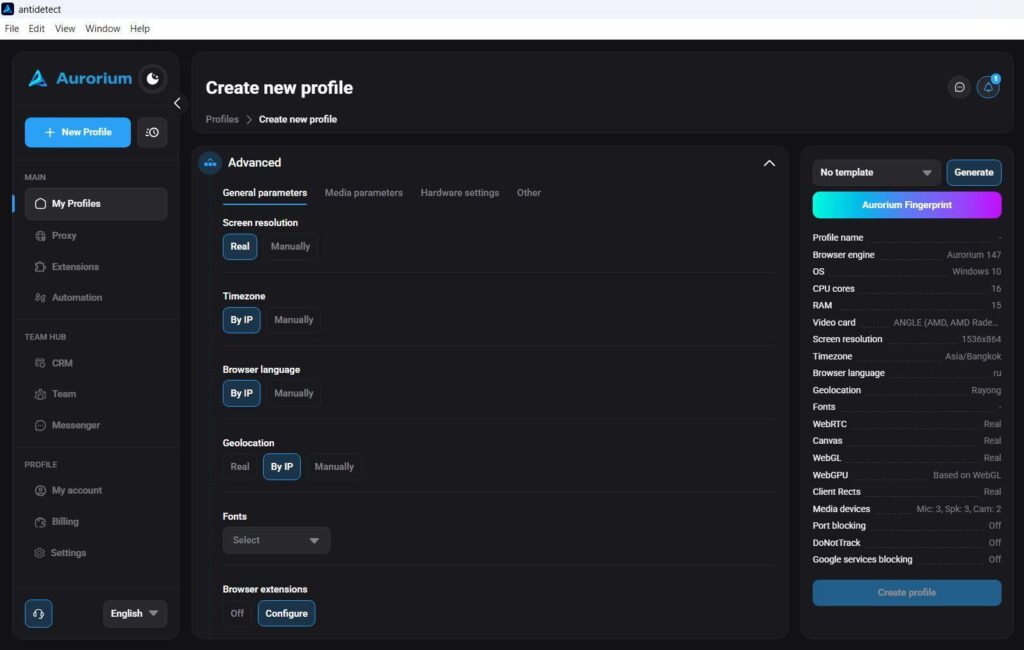
This matters because anti-fraud systems are already making these correlations. Aurorium’s approach closes a gap most anti-detects don’t even acknowledge exists.
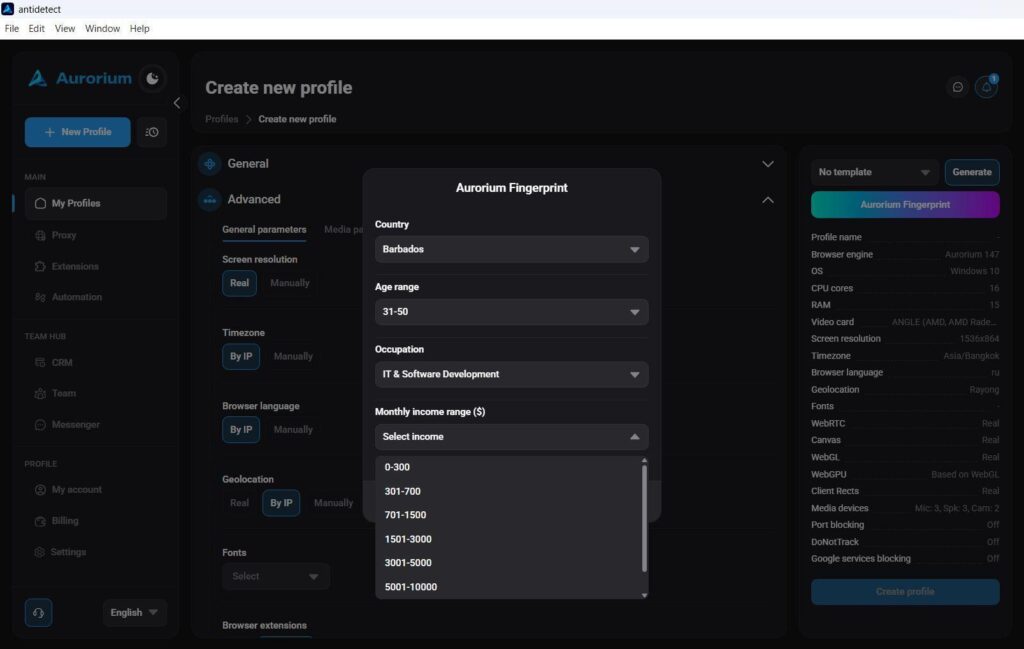
For users who prefer the traditional approach, manual and random fingerprint generation are both still available.
Fingerprint Uniqueness Control
Here’s a scenario every experienced affiliate has encountered: a profile gets flagged, you spin up a fresh one with clean proxies and properly farmed cookies — and it gets banned on login. No suspicious activity, no warm-up mistakes. Just an instant flag.
The likely culprit: fingerprint collision. Anti-detect browsers generate hardware parameter combinations that can repeat across profiles. If your banned fingerprint matches a new one, the new profile inherits the problem.
Aurorium solves this at the infrastructure level. AI-generated fingerprints within a single account are guaranteed to be unique. When a fingerprint gets blacklisted, the system actively excludes that combination when generating new ones. The collision problem isn’t just reduced — it’s eliminated.


Built-In Messenger
This one came as a genuine surprise. Most anti-detect browsers have a support chat widget. Aurorium has a full-featured messenger built directly into the client — with file sharing, voice messages, and read receipts.
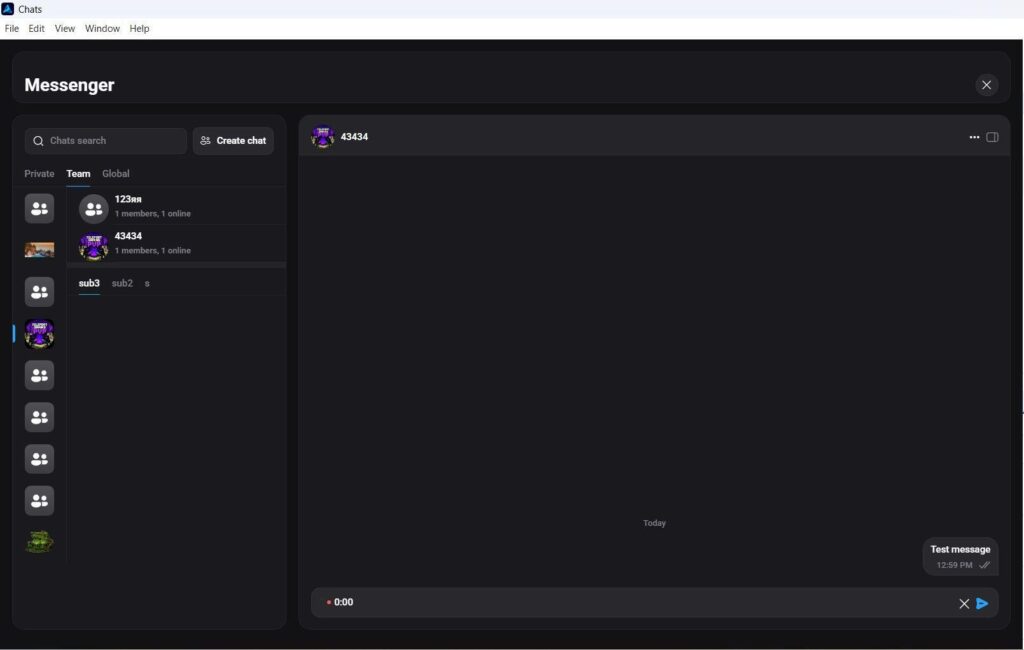
It’s organized into three tabs:
- Personal — private one-on-one conversations
- Team — internal communication within your department for campaign coordination
- Global — search and message any registered Aurorium user across the entire platform, regardless of plan
The Global tab is effectively a professional network for media buyers built into the tool itself. For teams that currently juggle a messenger, task tracker, and Google Sheets simultaneously, this consolidation changes the daily workflow noticeably.
Mobile App
The affiliate industry largely treats mobile management as a nice-to-have. Aurorium shipped a proper iOS and Android app at launch — not a stripped-down version, but a functional interface for team management on the go.
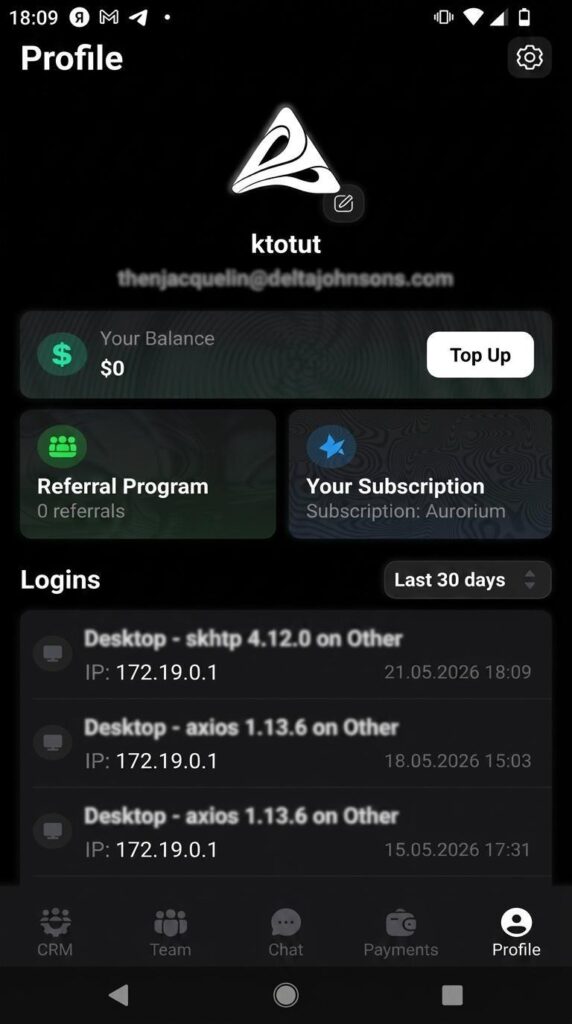
Assign tasks from your phone. Reply in the team chat. Handle payment or account access issues when you’re not at a desk. The app covers the scenarios where being stuck waiting for a laptop costs you time.
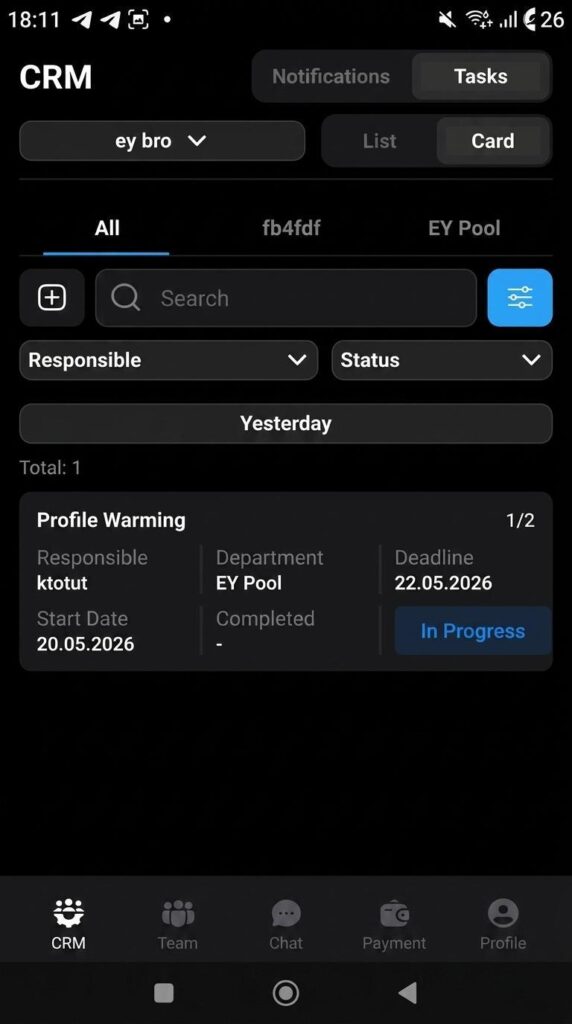
It’s a v1 product, so expect it to grow — but it’s already practical enough to use day-to-day.
Using promocode RICHADS4 you will get 4 days in tariff Pulse for FREE.
Working with the Anti-Detect Browser
Profile Creation
Profile creation offers a choice of Windows, Mac, and Linux, with OS version selection alongside. The interface isn’t cluttered — you can create a profile in a couple of seconds with one click of “Generate”, or spend 10 minutes assembling a custom setup tailored to a specific site’s requirements.
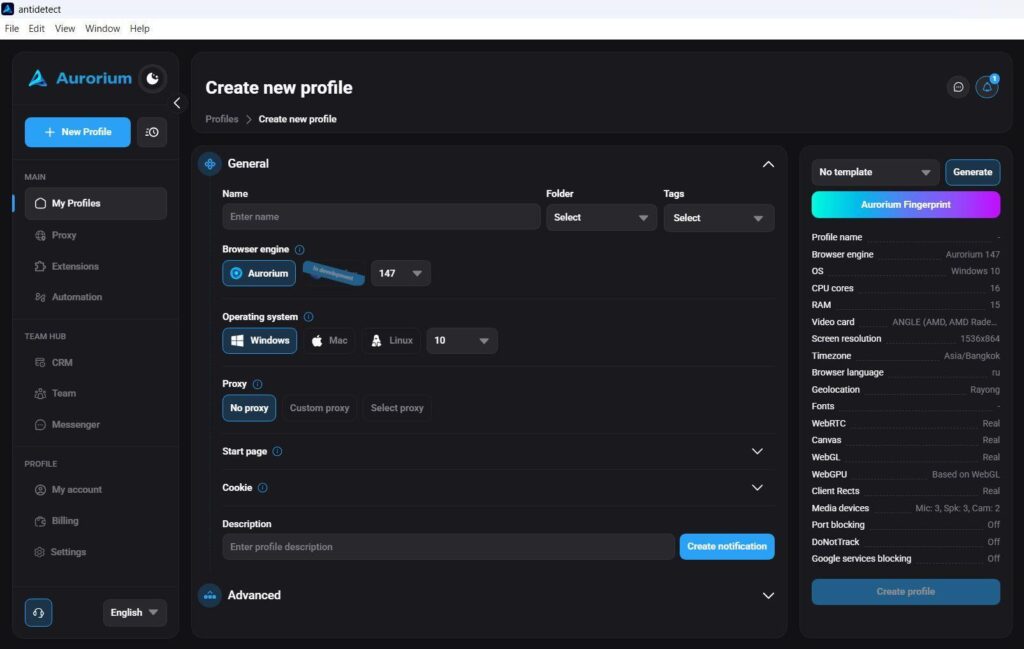
💡 Stick to the OS your actual machine runs on. Cross-platform spoofing (running Windows but presenting as Mac) introduces font rendering inconsistencies that no fingerprint tool fully resolves. Don’t manufacture risk where none needs to exist.
Working with Cookies and Sessions
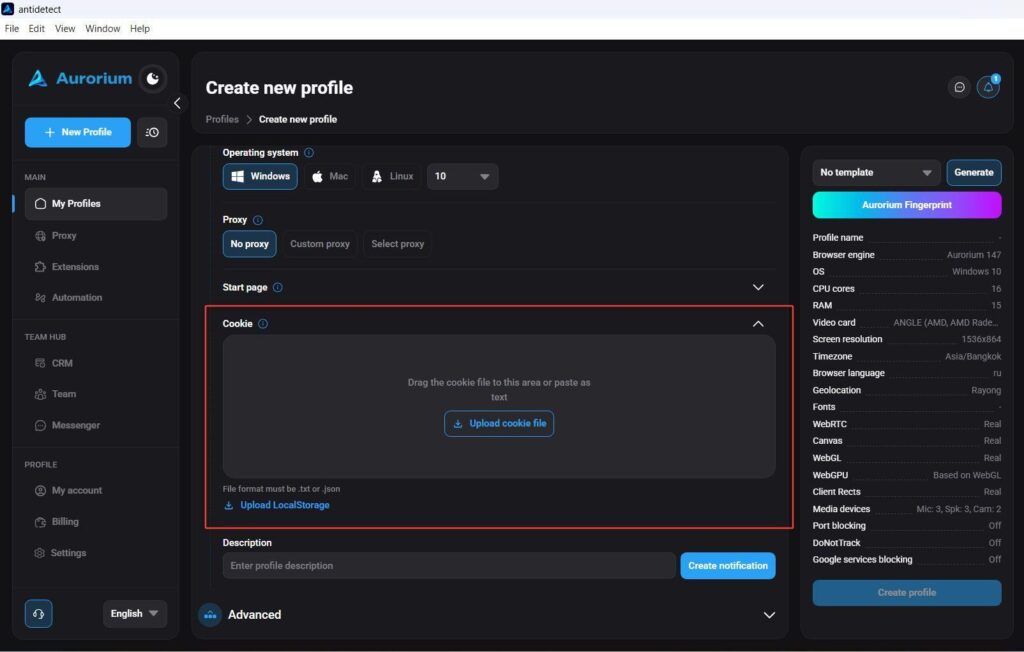
Cookie management is straightforward: drag and drop a JSON or Netscape file, or paste plain text. The “Restore previous session” function opens all your working tabs automatically when a profile restarts.
Advanced Settings: No Unnecessary Noise
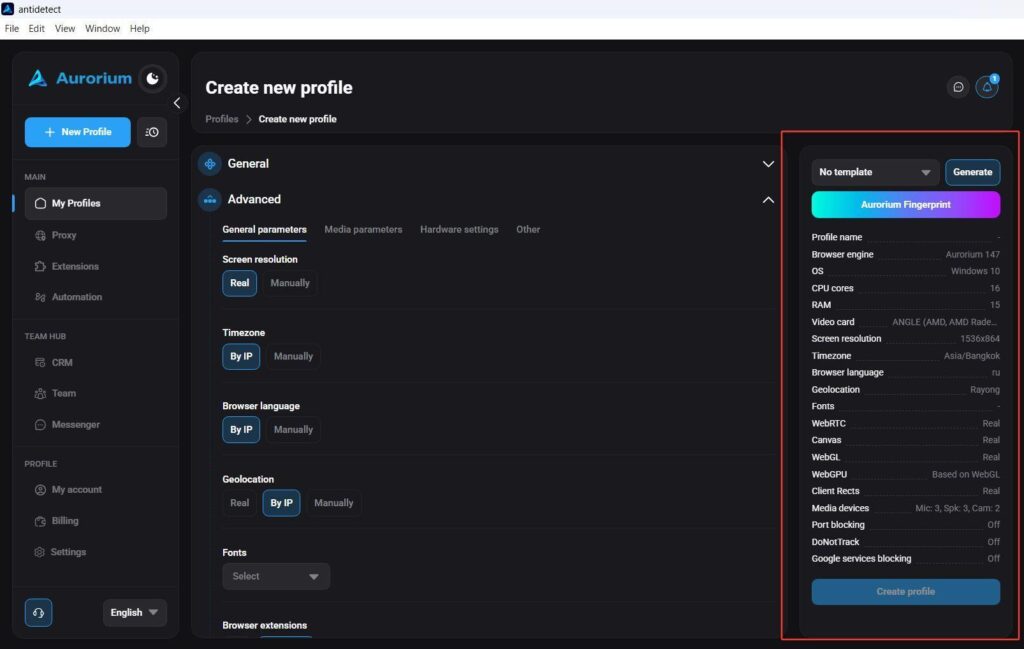
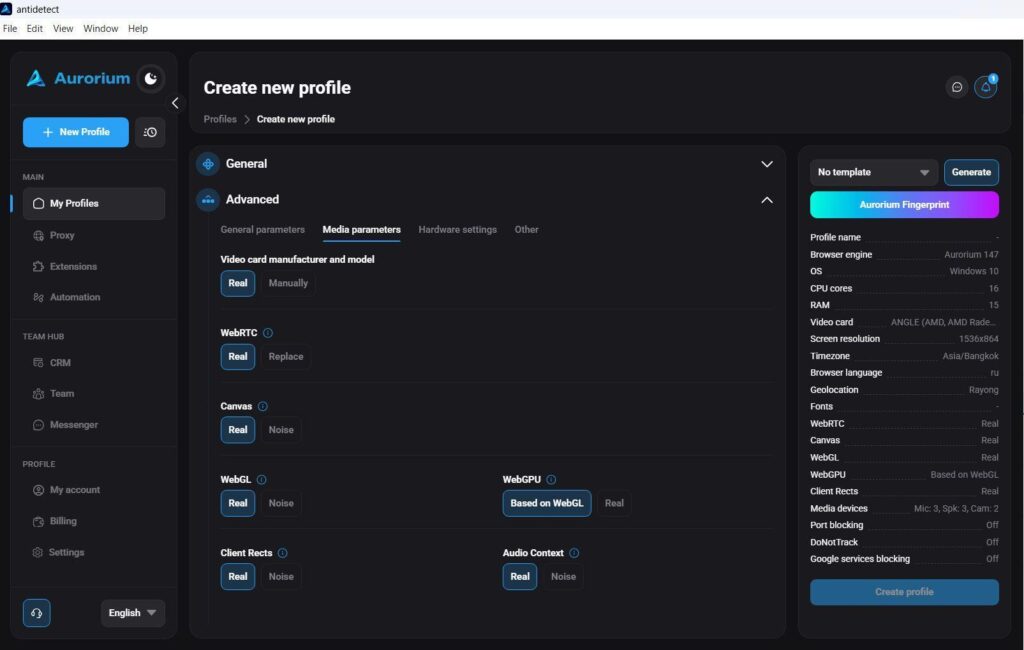
Timezone, browser language, and geolocation all default to “By IP” — the system pulls the correct values from your proxy automatically. This eliminates one of the most common reasons profiles get flagged early: a mismatched timezone or language that doesn’t match the proxy location.
Hardware and Media Parameters
For those who need full control: CPU core count, RAM, GPU model, WebRTC, Canvas, WebGL — all configurable manually. For standard use cases, the auto-generated fingerprint is solid enough to trust without adjustment.
Proxy Manager
Clean and functional: SOCKS5 and HTTP support, proxy health checks, IP rotation link. The standout detail is smart proxy string parsing: instead of manually splitting your provider’s string across four fields, you paste the full string in any format (ip:port:user:pass or user:pass@ip:port) and the system distributes the data automatically.
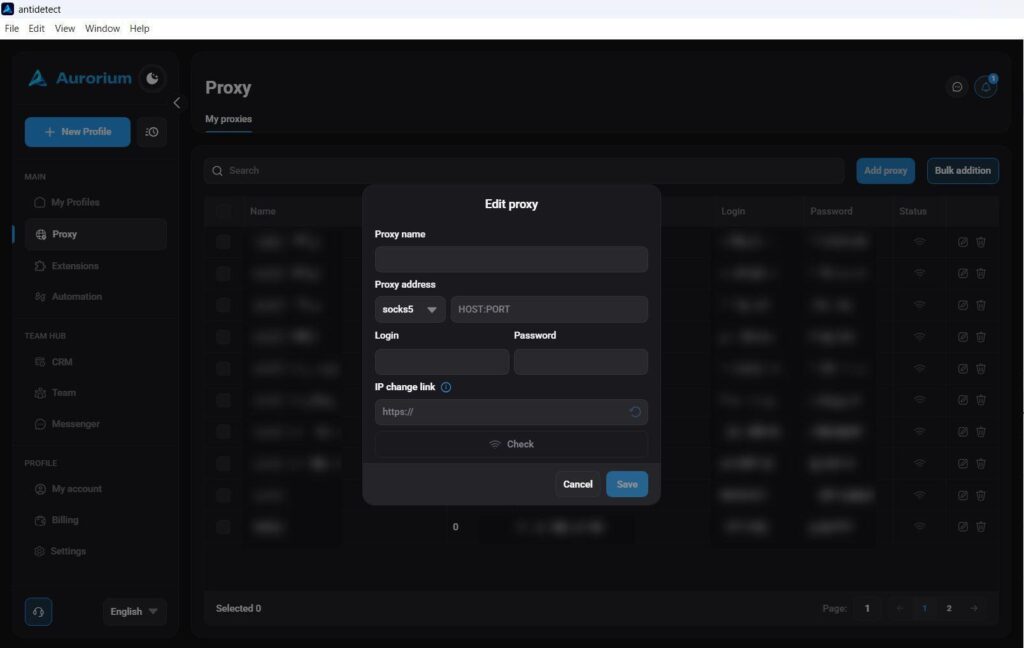
Small feature. Significant time saver when you’re loading hundreds of accounts.

Team Infrastructure: The Sunset of Google Sheets
The typical media buying team stack: anti-detect browser + Google Sheets for account tracking + Asana/Trello/ClickUp for tasks + a messenger for communication. Aurorium collapsed all of this into a single window with a flexible permissions system.
Multi-Workspace Support
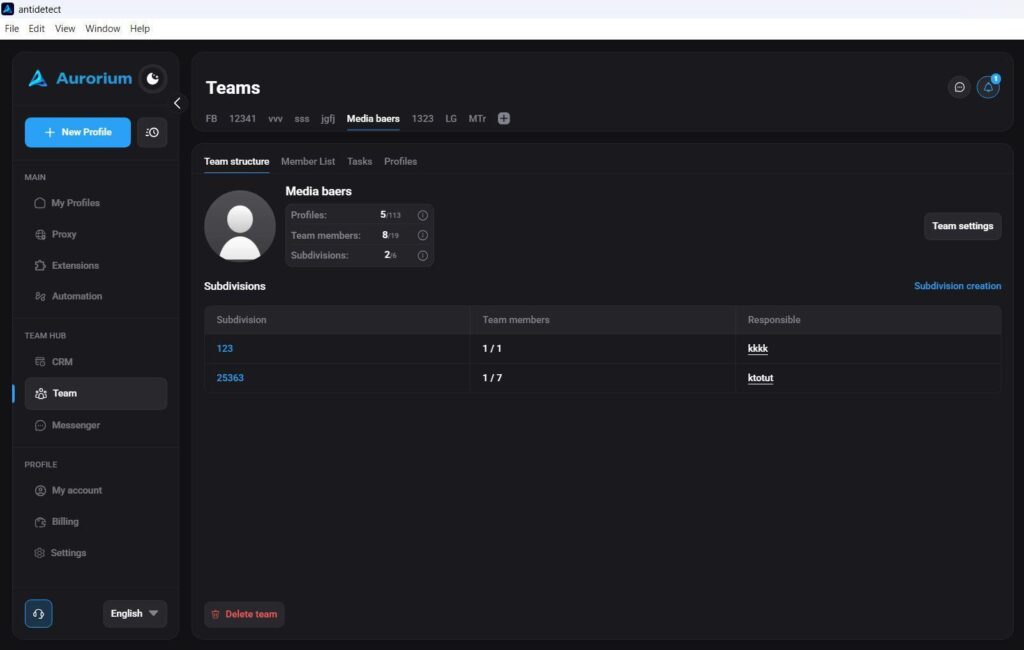
You can belong to multiple teams and maintain a personal account simultaneously — all within one client. No logging out, no session juggling. Owners can manage up to 10 teams; you can be a member of up to 20. Switching between workspaces takes one click.
Departments
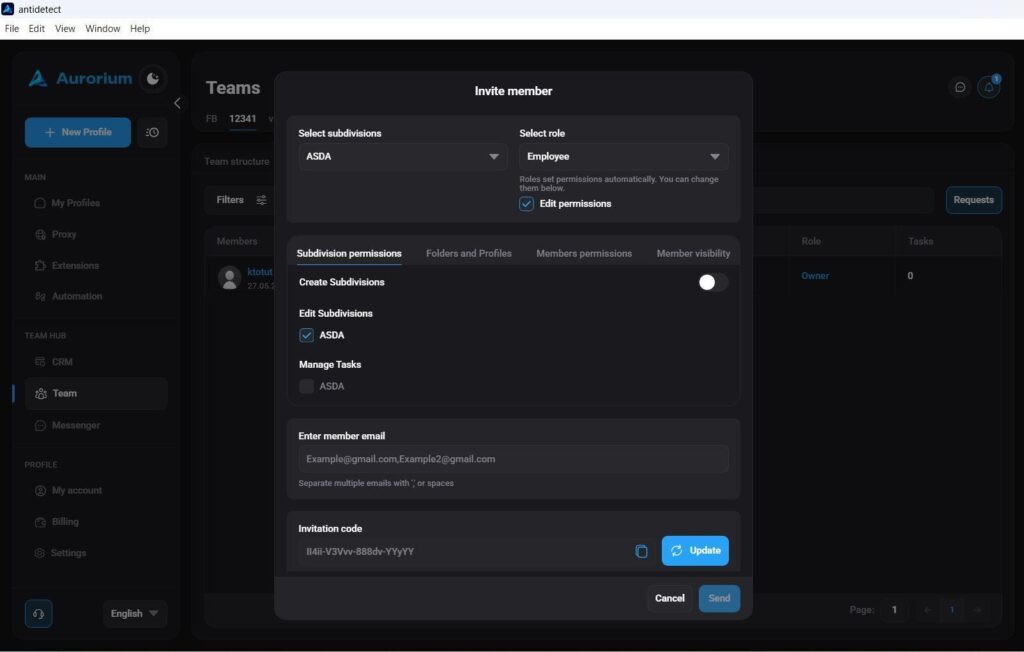
Inside a team, you can create departments — farmers, media buyers, and so on — with strict profile visibility controls between them. Each department sees only what it’s supposed to see.
Built-in CRM
The task management system takes obvious inspiration from Asana and Trello, adapted for affiliate workflows. Tasks have titles, descriptions, start dates, and deadlines. They can be assigned to specific departments and individuals, broken down into subtasks, and filtered by day, week, or month.
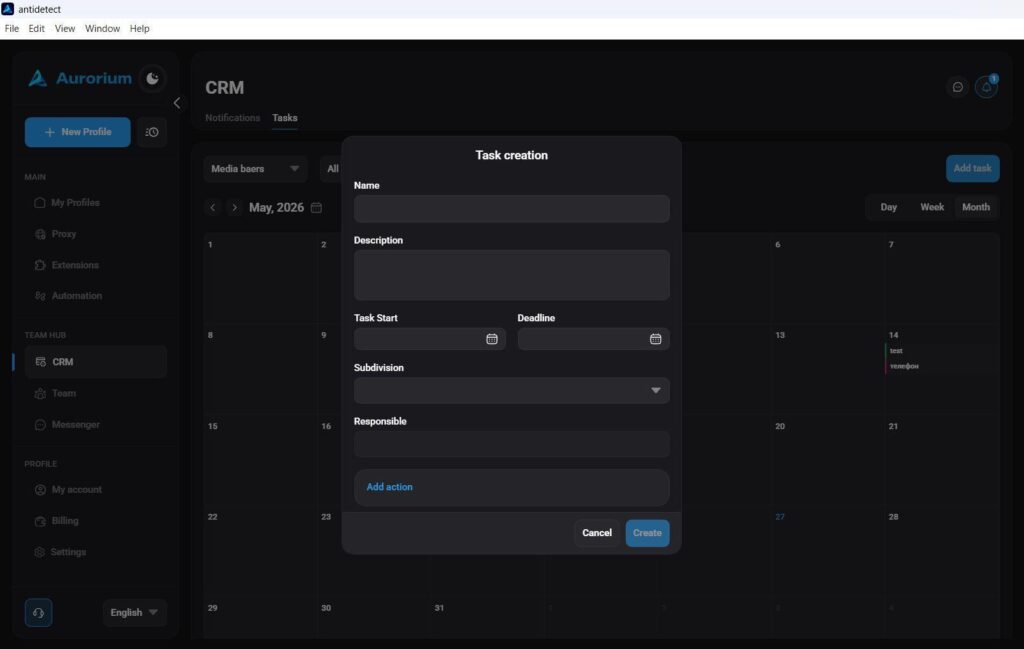
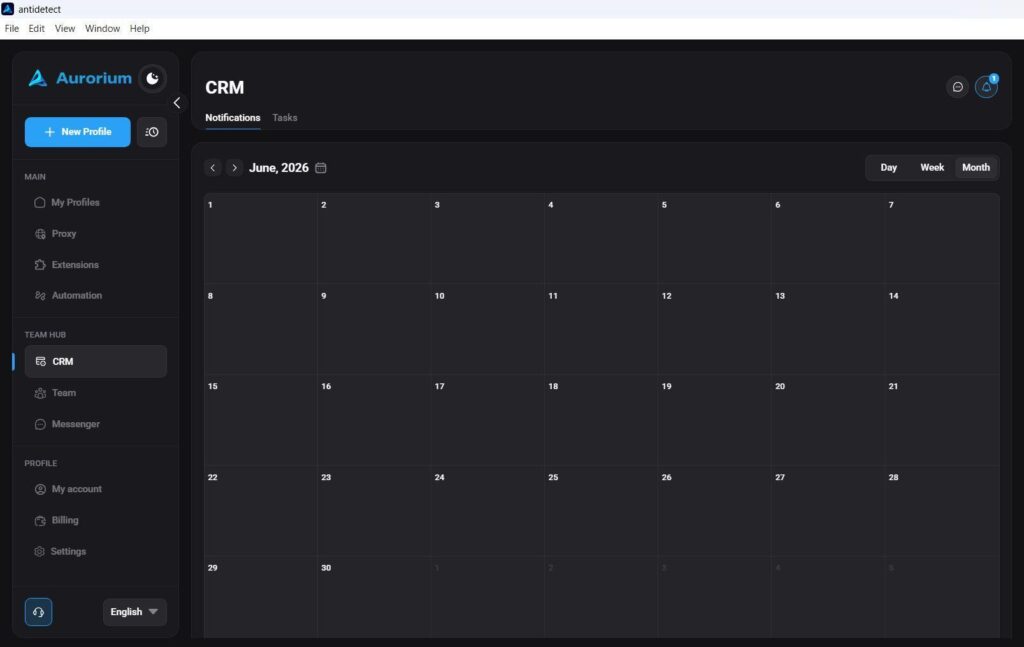
The system sends deadline notifications automatically. For teams currently held together by spreadsheets and group chats, this is a meaningful consolidation.
What Competitors Gave Up On
Action Synchronizer
For repetitive multi-account tasks — manual verification flows, form submissions, collecting bonuses — the Synchronizer mirrors all clicks, scrolls, and text input from one main window across all selected profiles simultaneously.
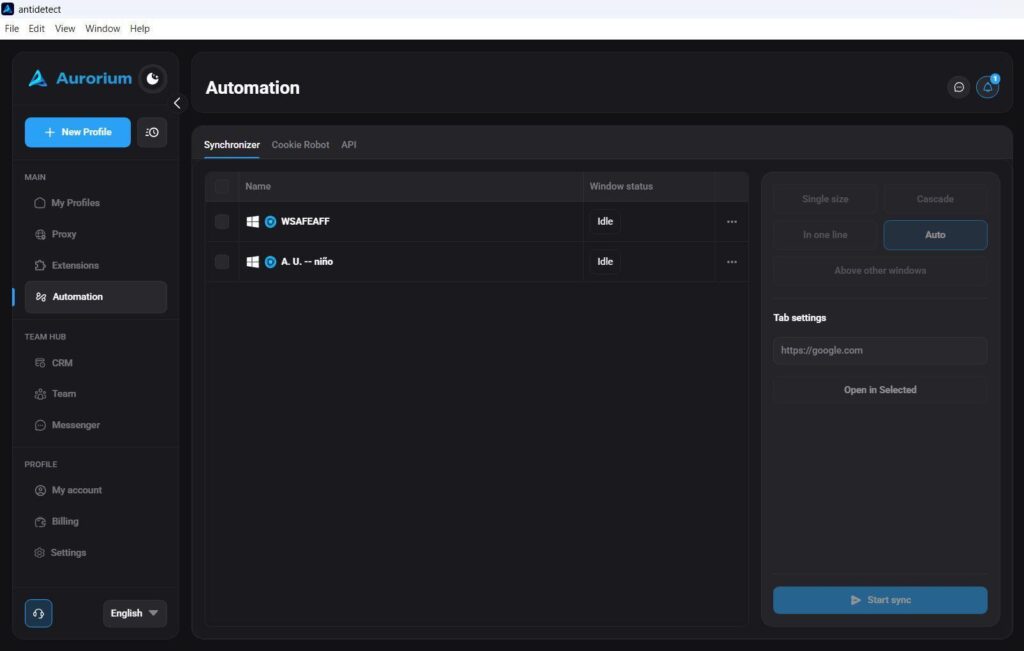
The implementation here is cleaner than most competitors. Windows can be tiled in configurable layouts, and a tab management function lets you open a specific URL across all active sessions in one click. Window overlap and focus loss — the usual pain points with this feature — are handled properly.
Interface Customization and Auto-Translation
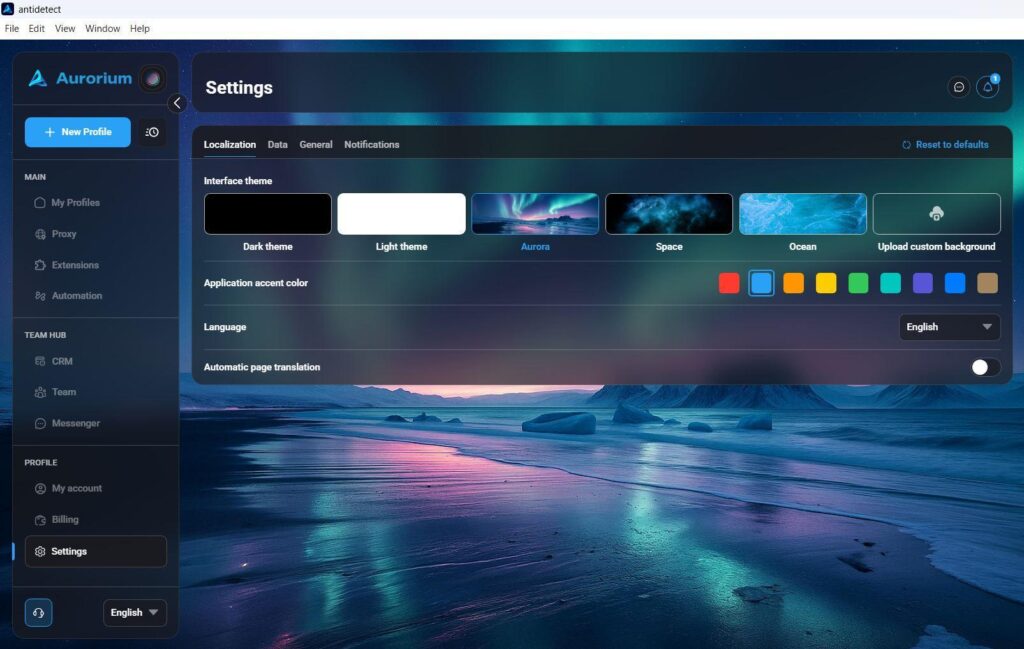
Beyond the standard light/dark toggle, Aurorium offers themed workspace backgrounds (Space, Ocean, Aurora) plus custom image upload. More practically: there’s a built-in automatic page translation toggle — especially useful when working with markets where the interface and landing pages aren’t in a familiar language.
Per-Profile Notifications
Timing management is a real operational problem at scale. Anti-fraud systems flag accounts whose sessions run unnaturally long, or where the gap before linking a payment method is too short or inconsistent. With 5–10 profiles, you can track this manually. At 50+, you can’t.
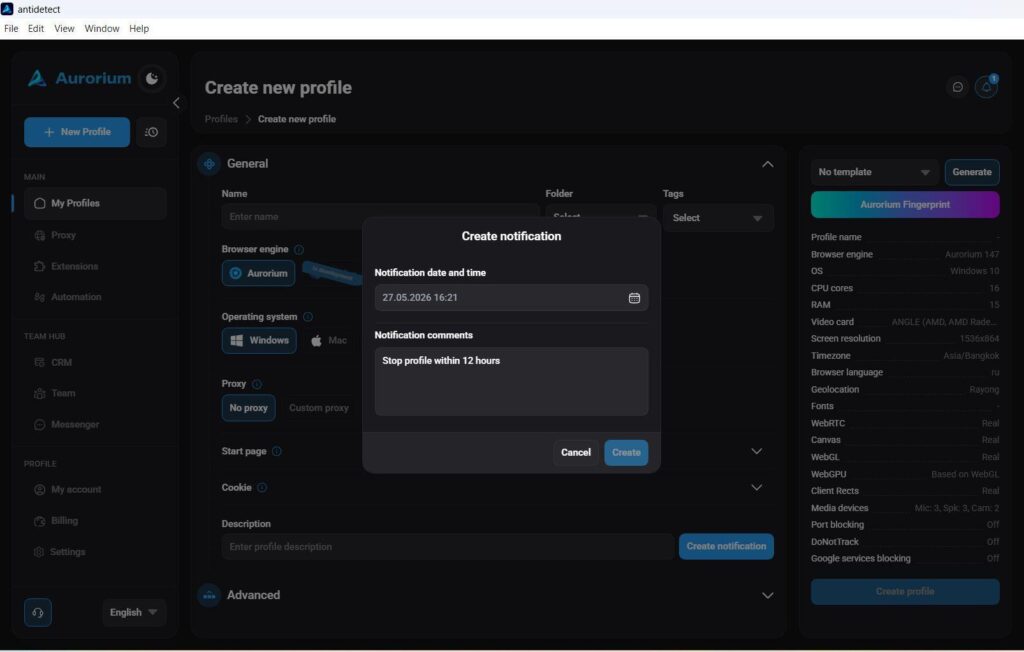
Aurorium lets you set individual reminders per profile — date, time, and a freeform comment. The system notifies you when it’s time to return to a specific profile, stop a session, or proceed with the next step. It replaces the sticky-note system and alarm barrage with something actually integrated into your workflow.
Security: Cure53 Audit
An anti-detect browser is a high-value target. It stores session data, account access, linked payment methods, and in many setups, API credentials. A vulnerability in the client isn’t a minor bug — it’s a potential total loss event.
Aurorium commissioned an external security audit from Cure53 — the firm that has previously audited NordVPN, Surfshark, and TorVPN. The results confirm isolated client architecture, encrypted cookie storage, and no developer-side backdoors.
For teams managing significant account portfolios, this isn’t a checkbox item — it’s material due diligence that most tools in this space haven’t done.
Conclusion
Aurorium isn’t repositioning an existing tool. It’s built around problems that most anti-detects haven’t solved: fingerprint-to-persona consistency, fingerprint uniqueness at scale, and team infrastructure that doesn’t require five separate tools to function.
The AI fingerprint generation is the most technically differentiated feature currently on the market. The team infrastructure — messenger, CRM, multi-workspace support, mobile app — addresses real operational pain for anyone running more than a solo operation.
If you’re managing multi-account workflows at any meaningful scale, Aurorium is worth testing.
Using promocode RICHADS4 you will get 4 days in tariff Pulse for FREE.
Try it now and launch your affiliate campaigns at the reliable ad network, RichAds!
What is RichAds?
Ad network for telegram ads,
high quality push and popunder ads,
domain redirect, native and display traffic source,
buy push ads at $0.005 (CPC), pop ads at $0.5 (CPM),
domain ads costs start from $1.5 (CPM), native ads — from $0.001 (CPC),
ad network offers large volumes of traffic in more than 200 geos from Tier 3 to Tier 1.






 Latest articles