


Why work with pre-roll video ads?
Pre-roll ads are short video ads that play before the main video a user wants to watch. They typically run 10 to 30 seconds and can be skippable after 5 seconds or non-skippable, playing through to the end.
You’ve surely seen them on YouTube, Twitch, Vimeo, and other streaming platforms — they’re also called in-stream ads there. The thing is, these ads work very well. They are engaging, vivid, and informative, delivering large traffic volumes across the globe.
Benefits of pre-roll advertising
Pre-roll marketing is conquering digital ad space, and for many good reasons:
- Ads can’t be ignored. The ad sits inside the video player where the user is already looking. There’s no banner blindness, and every impression is a real view.
- High CTR. Video ads convert clicks better than static formats because they’re more engaging. Motion, sound, an interesting story, and a strong CTA do what banners can’t.
- Storytelling. In 15–30 seconds, you can show a product in action, explain a benefit, and trigger an emotional reaction. That’s a big advantage for offers that need a bit of explanation, like Gambling, Dating, or Finance.
- Low cost. At RiсhAds, pre-roll CPMs are 2–3 times lower than popunder prices, while delivering stronger engagement. Bids can start as low as $0.05, so it’s affordable to test even on a small budget.
Ultimately, pre-roll video ads win for affiliate campaigns, ensuring high conversion rates.
What is RichAds?
Ad network for telegram ads,
high quality push and popunder ads,
domain redirect, native and display traffic source,
buy push ads at $0.005 (CPC), pop ads at $0.5 (CPM),
domain ads costs start from $1.5 (CPM), native ads — from $0.001 (CPC),
ad network offers large volumes of traffic in more than 200 geos from Tier 3 to Tier 1.
Best GEOs and verticals for pre-roll video advertising
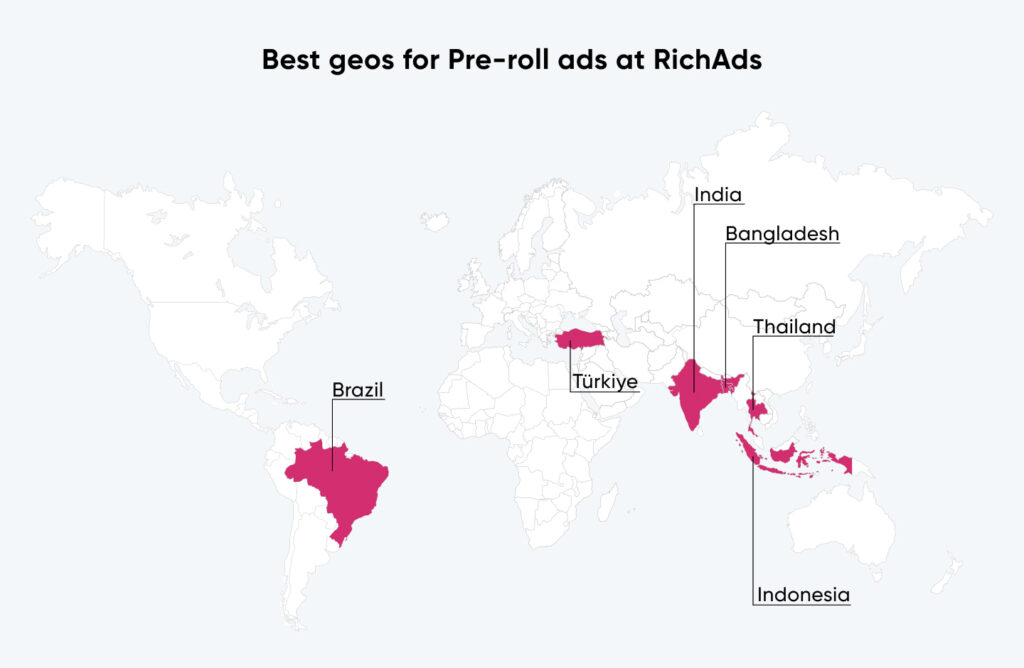
Pre-roll advertising works across GEOs and performs well for emotion-driven offers, where the audience wants to see the product in action. To determine the current top choices, we’ve conducted our internal research:
Best geos for pre-roll video ads
- India;
- Thailand;
- Brazil;
- Indonesia;
- Türkiye;
- Bangladesh.

Best verticals to run pre-roll ads
For mobile traffic on in-stream ads in June 2026 the best niches to promote are Gambling, Betting, E-commerce, Finance, and Sweepstakes. Desktop pre-roll video traffic in June works well for offers in Betting, Gambling, and Sweepstakes verticals.
The best niches for mobile in-stream ads:
- Gambling;
- Betting;
- E-commerce;
- Finance;
- Sweepstakes.
The best niches for desktop in-stream ads:
- Betting;
- Gambling;
- Sweepstakes.
Best geo-vertical bundles for pre-roll ads
Top-notch bundles to test for mobile video ads:
- Gambling: IND, IDN, THA, COL, MYS, VNM;
- Betting: IND, TUR, DEU, CAN, BRA, PAK;
- Dating: CHN, VNM, MYS, THA, IND, BRA.
Top-notch bundles to test for desktop video ads:
- Gambling: IND, THA, MYS, VNM, BRA, CAN;
- Betting: IDN, USA, DEU, BRA, GRC, TUR;
- Finance: USA, FRA, GBR, JPN, AUS, POL.
We regularly update data in the “Best GEOs and verticals” report to provide you with fresh info on top targeting solutions for primary affiliate formats. Check the guide every season to stay in the loop!

How to launch a pre-roll video campaign: step by step
Once all general questions are resolved, we can proceed with the actual pre-roll campaign launch. We’ve broken the process down into simple steps you should follow on the RichAds video ad platform.
1. Prepare your video creative
You need a short video:
- 10 to 30 seconds,
- MP4 format,
- under 20 MB,
- aspect ratio 16:9,
- resolution up to 1920×1080.
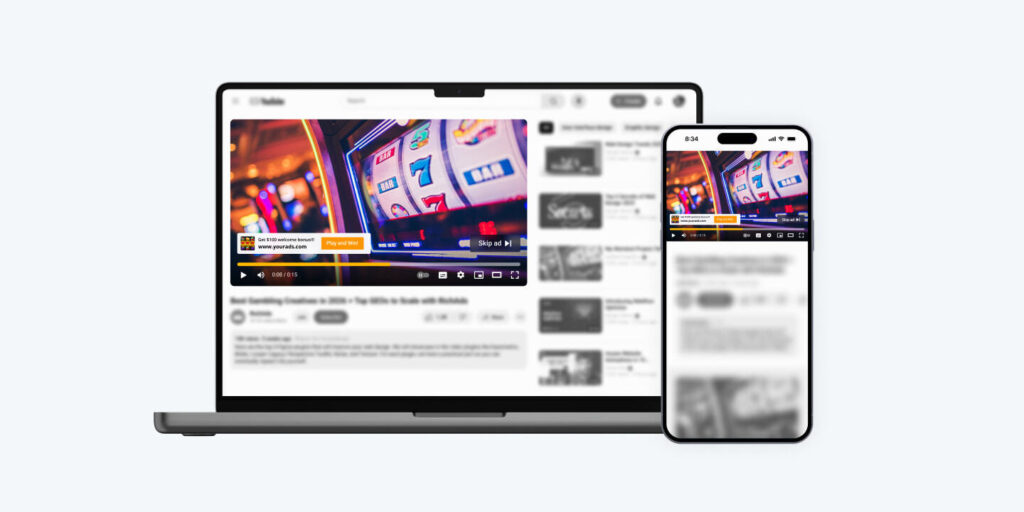
The first 5 seconds matter the most, as many publishers support only the skippable video format. Open with something bold, unexpected, or visually striking to catch the attention immediately.
You can build the video in Canva, Promo, Animoto, or a similar tool, or outsource production if you need something more polished. Also, some affiliate programs provide ready-made advertising materials, including pre-rolls. Additionally, there are a lot of AI video creation tools on the market, so you can easily generate your video ad.
2. Add destination URL
Insert the URL address of your landing page. Note that you can add only one landing page per campaign, so to test different landings, you need to launch a separate pre-roll video campaign!
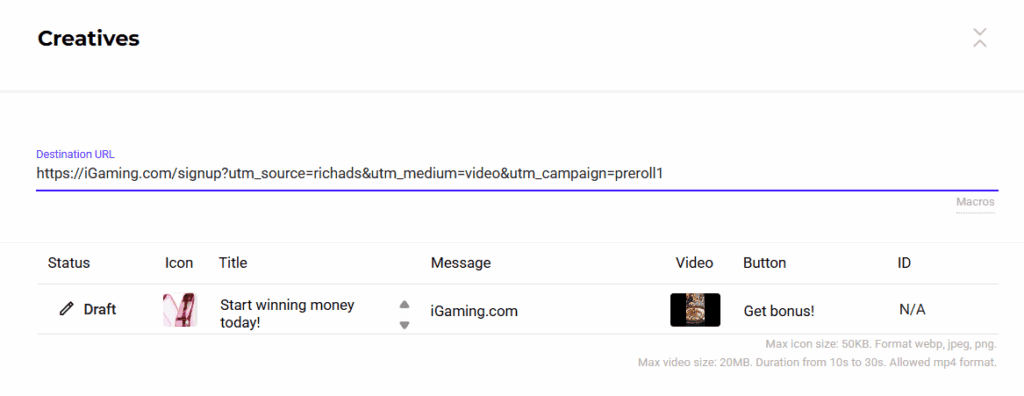
3. Fill in the ad content
Alongside the video file, you should provide info for the small banner block:
- Icon — a logo or image that signals what the ad is about.
- Title — a short line, up to 30 characters, that pushes toward action.
- Message — your domain, up to 60 characters.
- Button — a short, clear CTA, up to 10 characters.
The RichAds ad network lets you upload up to 5 videos per campaign, so you should fill in all fields for each one.
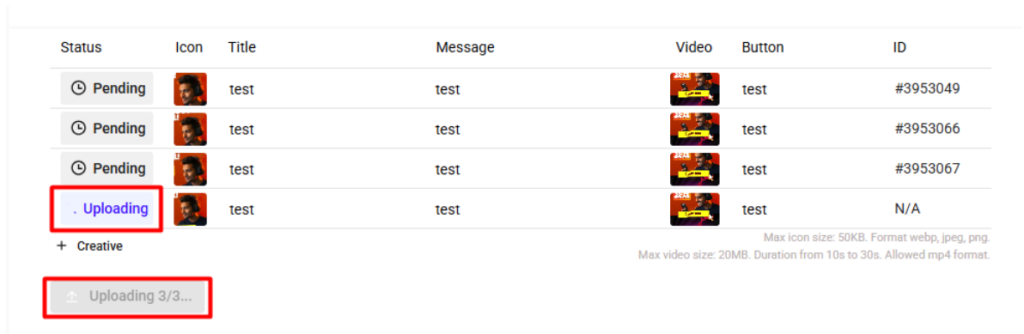
First, upload one video and save the campaign. After that, you can upload the others. Wait until all video creatives are fully uploaded, then save the campaign again.
4. Set your targeting
Define who sees your ad:
- GEO — country, and region or city if you want to narrow further.
- OS — specific operating systems, if you already know what performs for your offer.
- Language — match the language of your target audience.
- Device — mobile, desktop, or tablet. Run these as separate campaigns, since CPMs and audience behavior differ between them.
- Carrier — the system shows you the most popular carriers for mobile campaigns.
- ISP — choose internet providers to target in your desktop campaigns.
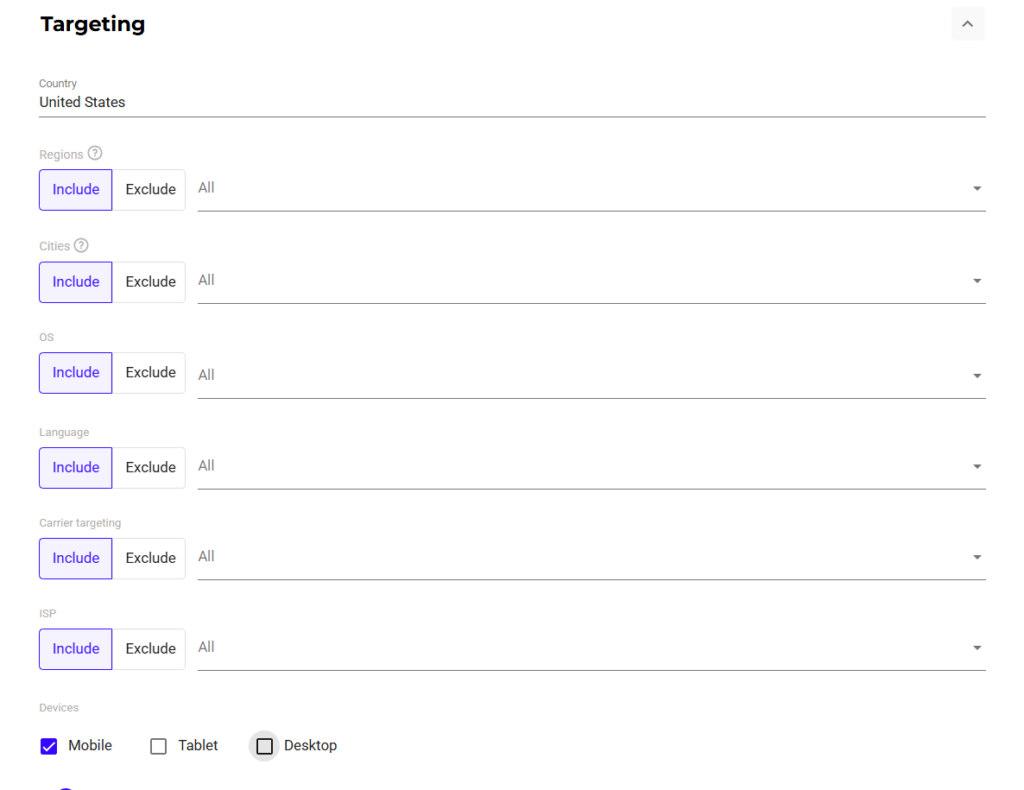
We recommend prioritizing mobile video ads, as they generally account for most traffic. Start by targeting Android and iOS devices on recent OS versions, and leave the targeting broad for initial tests.

5. Set your budget and bid
Pre-roll video ads run on a CPM model, so you pay per thousand impressions. Minimum bids at RichAds start from $0.05, and the algorithm shows you a recommended CPM for the GEO you’ve selected. Use that as your baseline, and bid a bit higher if you want to buy better-performing traffic.
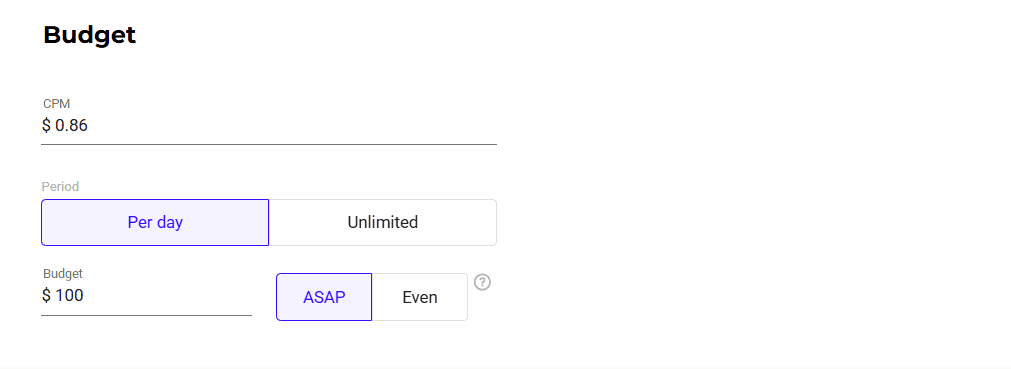
For testing, a daily budget of $100 is usually enough to gather meaningful data. When you know what converts, you can optimize your budget to avoid overspending.
6. Set frequency cap
The frequency cap regulates how many times a user is shown your pre-roll advertising video. To prevent overwhelming users with your campaign, we recommend setting this parameter to 1 view per user per day.
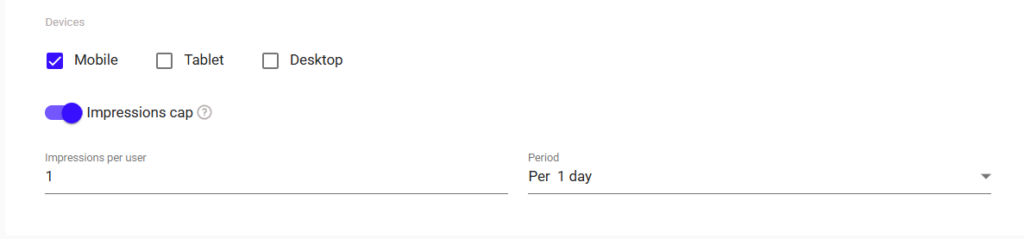
But if you urgently need to gather as many impressions as possible, you can adjust this cap. For example, during major events like the Football World Cup, the frequency cap may be increased to 2 or even 3 times.
7. Pick your traffic sources
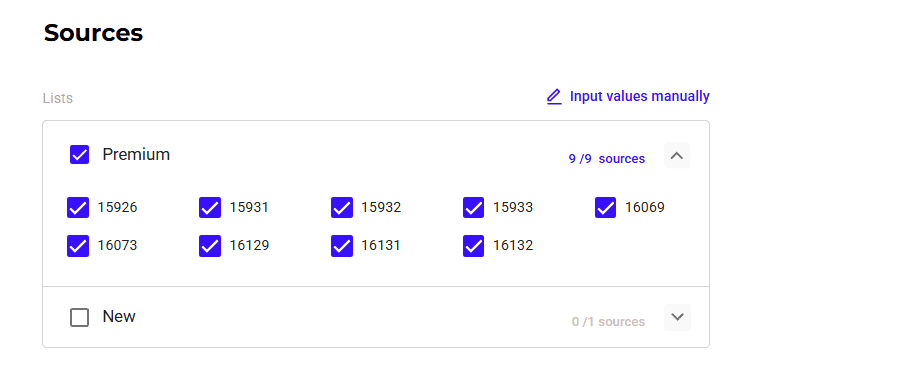
The RichAds ad platform offers a “Premium” source option, so you can start with high-quality placements right away. It allows you to skip the slow manual-testing phase and get conversions faster.

8. Use whitelists and blacklists
- Whitelist — is a list of traffic sources that convert the most at the desired price.
- Blacklist — is a list of poorly performing traffic sources that bring few conversions or are too expensive.
Composing whitelists to target only converting sources and turning off sources from blacklists are crucial steps of campaign optimization.
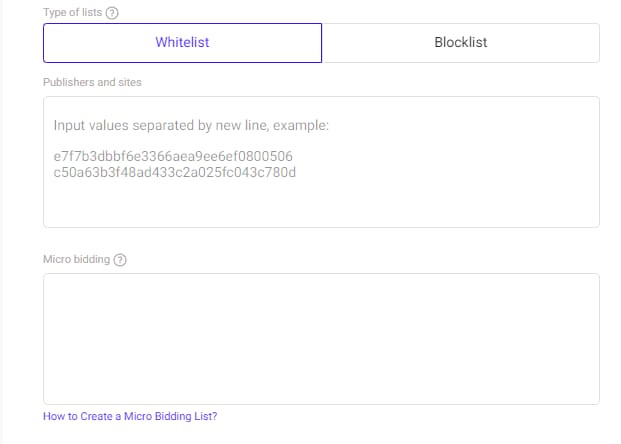
You can get whitelists and blacklists from your manager in advance, depending on your loyalty program tier.
9. Set the campaign schedule
For an initial test, running full-time is usually the better call, as it lets you see when your audience is actually active. Once you have data, you can narrow the schedule to match.
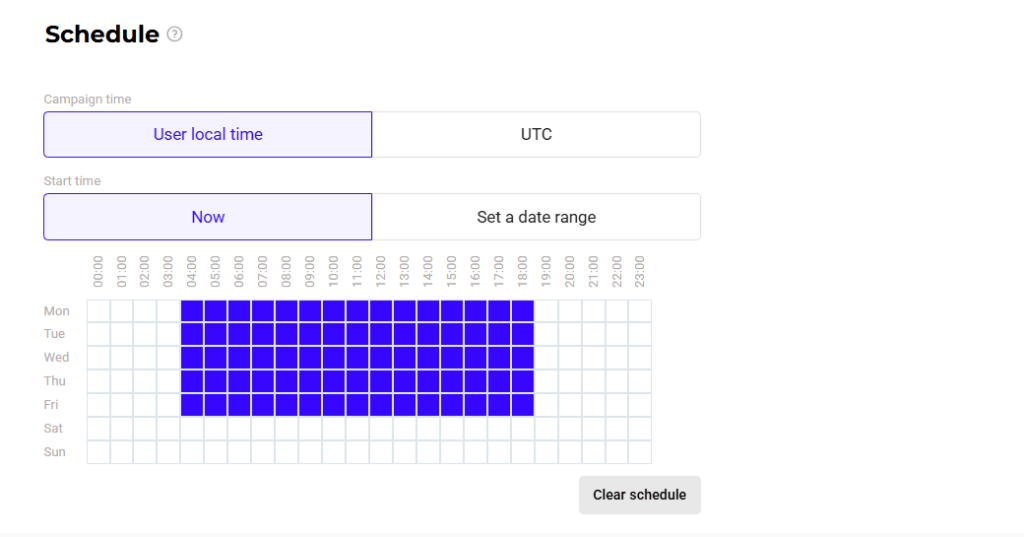
If your offer is time-sensitive, such as live events or a call center with specific business hours, set the schedule right away.
That’s the whole process. Save and launch your pre-roll video campaign, just don’t forget about ongoing optimization.
What is RichAds?
Ad network for telegram ads,
high quality push and popunder ads,
domain redirect, native and display traffic source,
buy push ads at $0.005 (CPC), pop ads at $0.5 (CPM),
domain ads costs start from $1.5 (CPM), native ads — from $0.001 (CPC),
ad network offers large volumes of traffic in more than 200 geos from Tier 3 to Tier 1.
Optimization tools for pre-roll ad campaign
Optimization is actually the most important step that affects the profitability of your pre-roll campaign. You can check our guide on the video ads performace to learn all the valuable metrics and their benchmarks.
Once your campaign is live, use these tools:
- Conversion tracker. Connect a tracker so you can see exactly which sources, GEOs, and creatives drive conversions. Without tracking, you’re optimizing blind.
- Micro Bidding. Once you have enough data from the test, use Micro Bidding to set custom bids for specific sources, so you spend on what really converts.
- Automated Rules. Set rules that automatically blacklist underperforming sources or creatives, or pause a campaign once it hits a cost threshold. This RichAds tool prevents your budget from leaking when you’re not actively watching the dashboard.
To understand pre-roll traffic efficiency, check out our real-life Betting case on pre-roll ads in Indonesia. RichAds ran a 30-day pre-roll video campaign for a Betting brand in Indonesia. The client wanted to grow reach aggressively while keeping cost per deposit predictable and low. As a result, the testing drove 165M+ impressions, 9,000 registrations, and 468 deposits at a $53 cost per deposit. The high CTR of 4.6% at just $0.0033 eCPC — proof that pre-roll can scale volume aggressively without sacrificing quality in competitive verticals.
Conclusion
Pre-roll video ads combine guaranteed visibility, strong targeting, and low CPMs, making them a leading choice for affiliates. Get a Gambling, Betting, or Dating offer, choose one of the top-performing video ad GEOs, and launch your pre-roll campaign following the guide carefully. If you do everything right, the format rewards with high CTR and strong ROI.
What is RichAds?
Ad network for telegram ads,
high quality push and popunder ads,
domain redirect, native and display traffic source,
buy push ads at $0.005 (CPC), pop ads at $0.5 (CPM),
domain ads costs start from $1.5 (CPM), native ads — from $0.001 (CPC),
ad network offers large volumes of traffic in more than 200 geos from Tier 3 to Tier 1.

FAQ on pre-roll video campaign
It’s an ad campaign that runs short video ads before the main video content a user chooses to watch. The ad shows an icon, title, domain, and CTA button, and clicking it sends the viewer to your offer page. Pre-roll video runs on a CPM model, so you pay per thousand impressions.
When a user clicks play on a video, your ad loads first. It’s either skippable (the viewer can skip after 5 seconds) or non-skippable (it plays through to the end).
The platform matches your ad to viewers based on your targeting settings: GEO, device, OS, and so on. On affiliate ad networks like RichAds, you’re usually charged per thousand views; on streaming platforms like YouTube, some video ads use a CPV pricing model.
To succeed, you need several engaging video creatives for testing, a connected conversion tracker, detailed targeting, and advanced optimization tools, including whitelists, micro bidding, and automation.
Look for dedicated video ad networks like RichAds, which offer everything you need for a successful launch.
The basic set includes GEO (country, sometimes region or city), device type (mobile, desktop, tablet), OS, and language.
Some platforms, like RichAds, also let you target by carrier, ISP, and schedule, and you can set an impression cap, which is how many times a user sees the ad per day.
Connect a conversion tracker first — without it, you’re optimizing blind. From there, build whitelists of converting sources and cut the ones that don’t perform, and use micro bidding to fine-tune bids by source or GEO.
If you launch on the RichAds ad network, you can also use the Automated Rules feature to pause or blacklist underperformers automatically. The platform has a pre-made Premium sources list, and managers can also provide custom whitelists for your specific offer.








 Latest articles