

Count how many hours last week went into maintaining the farm. Creating profiles, assigning proxies, warming accounts up, figuring out why a script failed on a third of the accounts, rewriting a selector after the platform’s latest update.
Afina Browser simplifies that, and not only through profile isolation. An AI agent connects to the app, and the farm starts responding to plain text in a chat window. Type “create 100 profiles for Poland, assign proxies from the pl-proxies group, and split them into four groups,” and a few minutes later they’re sitting in the table.
Overnight warmup works the same way, and so does troubleshooting: the agent reads the logs itself and tells you which step broke. Here’s where this actually saves hours, and where you still need to step in by hand.
How Profile Isolation and Digital Fingerprint Work in Afina
Afina builds a separate environment for every account: its own folder, process, cookies, extensions, proxy, and digital fingerprint. Profiles live in a table, get organized into groups, and launch one at a time or in batches of up to a thousand.
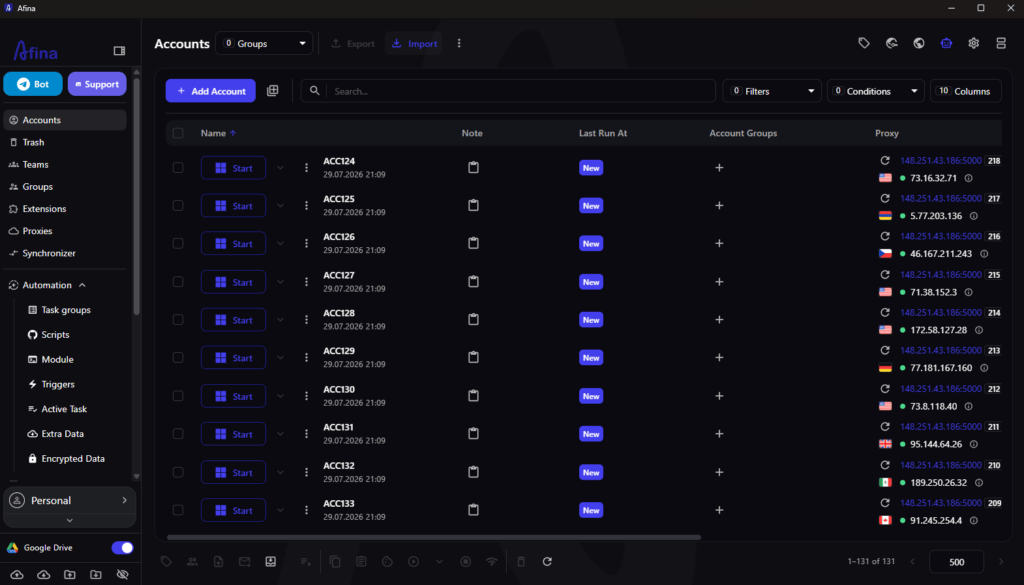
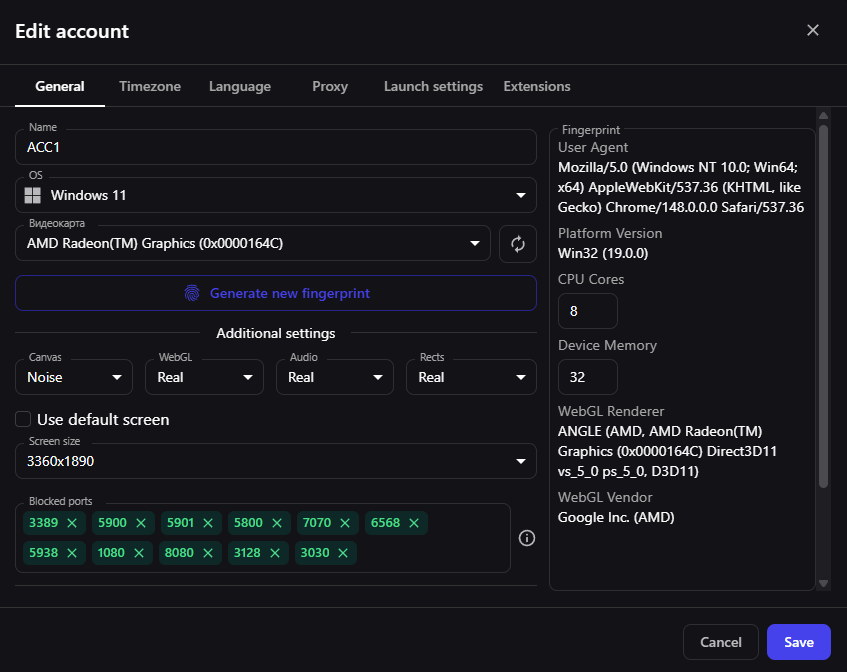
The fingerprint isn’t set with a single “make it good” checkbox. It’s built from specific parameters: operating system, User-Agent, graphics card, core count, RAM, screen resolution, blocked ports, and noise settings for Canvas, WebGL, Audio, and Rects.
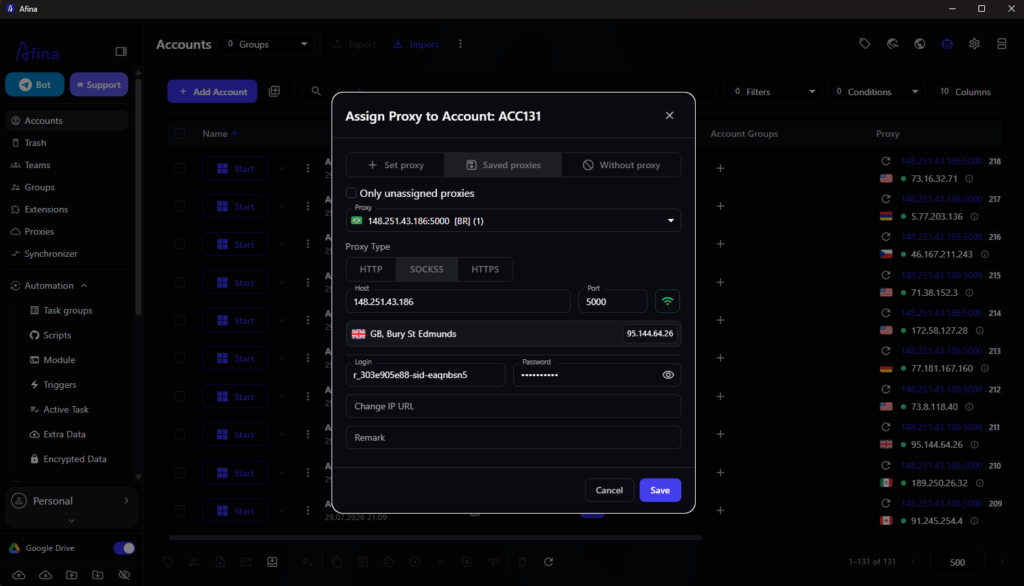
Most teams drop the ball here: you can tune the fingerprint perfectly and still give yourself away through the network stack, because the proxy doesn’t tunnel UDP. Without it, QUIC and HTTP/3 break, and the connection looks nothing like a regular user on the same provider.
| Proxy type | UDP and QUIC support | Where it fits |
|---|---|---|
| 🏠 Residential | Partial, depends on the provider | Registrations, long account warmup |
| 📱 Mobile | Rarely | Social media, platforms that demand high trust |
| 🏢 Datacenter ISP | Usually yes | Bulk runs, scraping, automation |
Bulk proxy checks in Afina return three things per address: host availability, exit country, and a UDP test result. Run this before the first launch, when you assign the proxy. Once an account is warmed up, it has already handed the platform its network fingerprint, and swapping the IP afterward won’t undo that.
You can see the result inside the profile itself: a WebRTC test in a running account should show the same IP as the proxy, with no local addresses in the ICE fields.
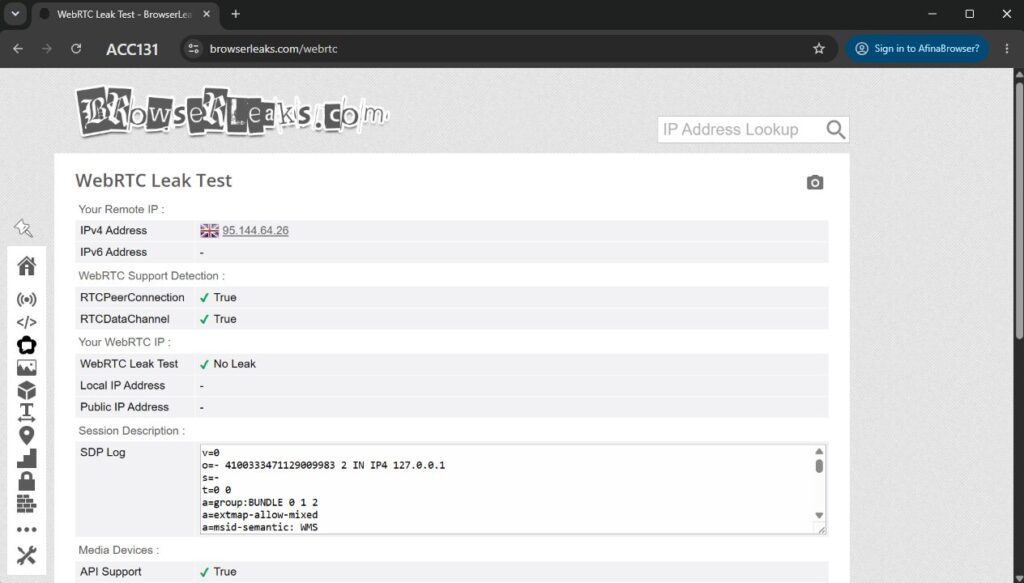
This is baseline hygiene serious operators settled on years ago. Comparing antidetect browsers on isolation alone barely makes sense anymore. The real difference starts one floor up.
What is RichAds?
Ad network for telegram ads,
high quality push and popunder ads,
domain redirect, native and display traffic source,
buy push ads at $0.005 (CPC), pop ads at $0.5 (CPM),
domain ads costs start from $1.5 (CPM), native ads — from $0.001 (CPC),
ad network offers large volumes of traffic in more than 200 geos from Tier 3 to Tier 1.
Why an Antidetect Browser Needs an AI Agent and an MCP Server
An antidetect browser answers one question: who are you to the platform. Those settings are static, set once and they hold. The other half behaves completely differently: the behavior inside the profile, changing from site to site and breaking every time a platform ships an update.
Teams used to cover that half with scripts, and a script meant a developer on the team and a permanent maintenance debt. That’s where AI stepped in. The browser provides the body: fingerprint, isolation, network stack. The agent provides the mind, the ability to read an unfamiliar page and adapt without rewriting code.
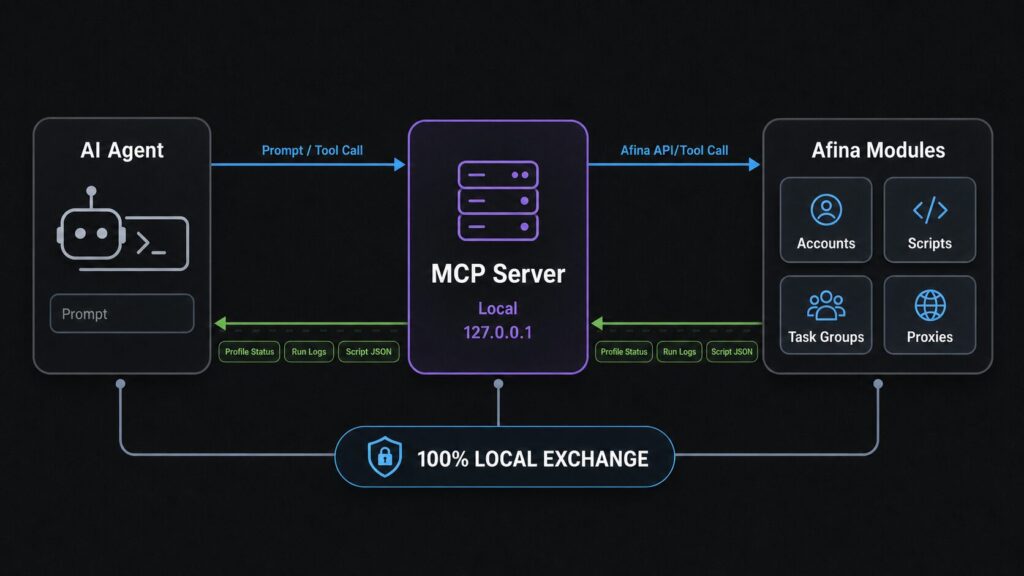
In Afina, an MCP server handles that interaction. It starts up alongside the browser on a local address, and the agent gets 92 tools across nine categories: accounts, browser sessions, cookies, RPA scripts, modules, Task Groups, proxies together with mail and databases, migration, and CDP. Any MCP-compatible client works, in practice Claude Code, Cursor, or ChatGPT.
Security is solved at the architecture level. The agent never sees your passwords, keys, or 2FA codes: it works with metadata and names, while the actual values stay encrypted with AES-256-CBC and get decrypted outside its field of view. Processing happens on your machine; only the request text sent to the model ever leaves it.


How to Create 100 Profiles for a New Geo in a Single Command
The campaign launches tomorrow: a hundred accounts across several tiers, each with the right proxy, timezone, and language, sorted into groups. Here’s the request:
Create 100 accounts named ACC1 through ACC100. Split them by geo: ACC1-25 get a proxy from the pl-proxies group, timezone Europe/Warsaw, language English. Create four groups and put the matching 25 accounts into each. Show me the first 5 before saving.
The agent sets the geo, language, proxy, and timezone, creates the groups, distributes the profiles, and shows the first five for a sanity check. That last line isn’t accidental: the agent waits for confirmation before saving a hundred records.
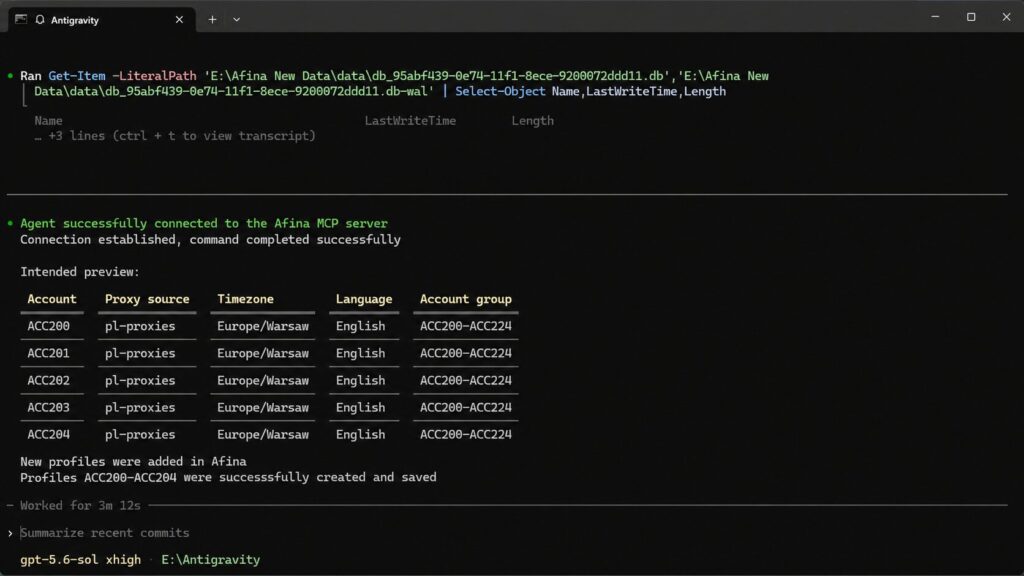
Doing this by hand means an hour of clicking through the bulk-creation form. Here it’s one paragraph and one click.
What is RichAds?
Ad network for telegram ads,
high quality push and popunder ads,
domain redirect, native and display traffic source,
buy push ads at $0.005 (CPC), pop ads at $0.5 (CPM),
domain ads costs start from $1.5 (CPM), native ads — from $0.001 (CPC),
ad network offers large volumes of traffic in more than 200 geos from Tier 3 to Tier 1.
What to Do When an RPA Script Fails on Part of the Accounts
This is the most common objection to automation, and it’s a fair one. Scripts fail; that’s normal. The real question is how much the troubleshooting costs: open active tasks, check statuses, open one account’s log, look for a pattern, jump back into the editor, fix it, restart. Half an hour, if you’re lucky.
Read the logs for the Promo warmup task group. How many tasks failed, what were the errors, and at which steps? Group them by type. Change the captcha button wait timeout from 5000 to 15000 ms and restart only the tasks that failed.
The agent filters tasks by status, reads the logs, groups the causes (timeout too short, proxy failure, element that never showed up in time), finds the right block in the script’s structure, and changes the parameter. A built-in validator catches small JSON errors before anything gets saved.
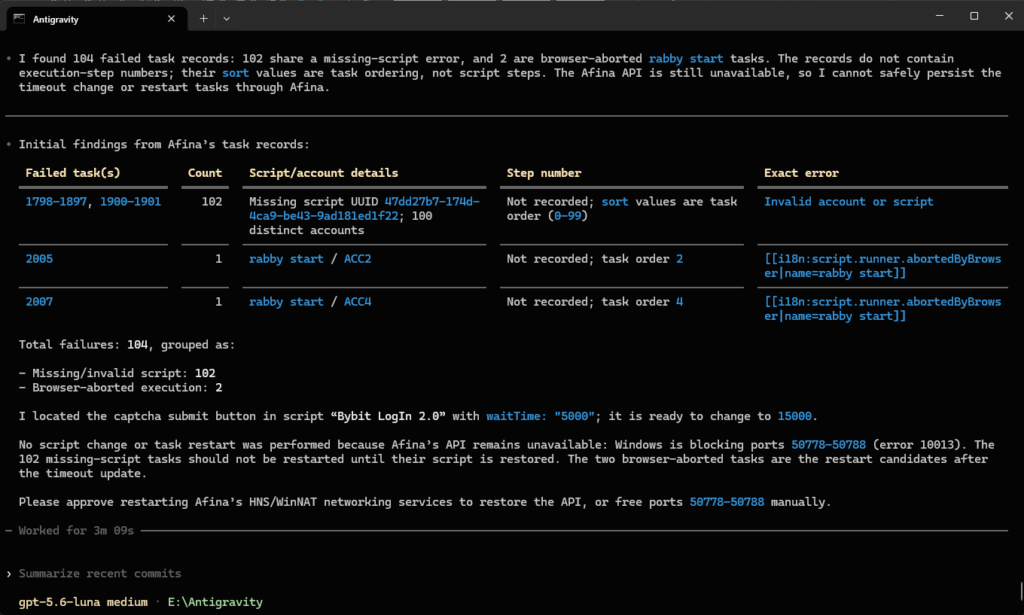
Only the twelve failed tasks go back into the queue, not all hundred. Nobody has to hunt down and fix a selector error by hand.
The same logic applies when the layout changes. The agent doesn’t guess at selectors blindly: it finds the element by visible text or placeholder and gets back an exact CSS selector or XPath, or takes a screenshot and reads the page if the element isn’t found. It saves the working sequence as a full RPA script inside Afina.
No-Code Automation in the Visual Script Builder
Not everyone is ready to hand an agent the keys to production accounts, and that’s fair. The script builder works independently of MCP and covers the same tasks by hand.
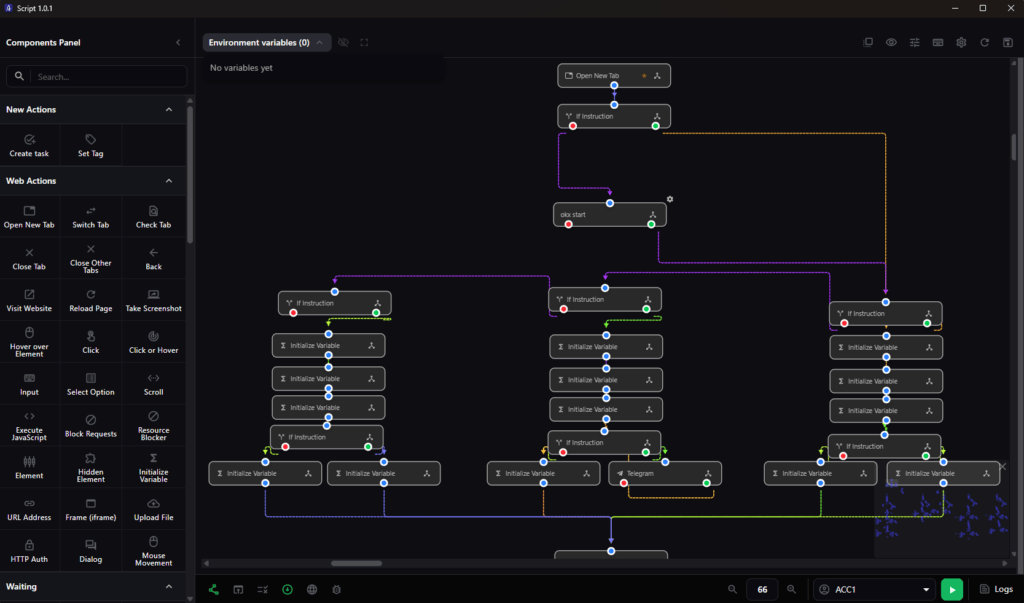
A script is assembled from blocks on the canvas: navigation, clicks, text input, waits, conditions, loops. Every block has a red branch, the path for when something fails, and that’s the one people forget to wire up most often. When that happens and an element is missing, the script just stops and goes quiet.
For routine tasks, you don’t need to write anything. The Automation Hub is a built-in catalog of ready-made scripts and modules with tag search, and Cookie Robot handles basic warmup: paste in a list of URLs, set the crawl depth, and the robot works through the list on its own, collecting cookies.

Scaling with Task Groups and the Window Synchronizer
A Task Group is a queue that runs a script across hundreds of profiles on its own. You set the rules once: how many accounts run in parallel, how many retries after a failure, which time window the group runs in, whether to shuffle the order, and how many minutes per session.
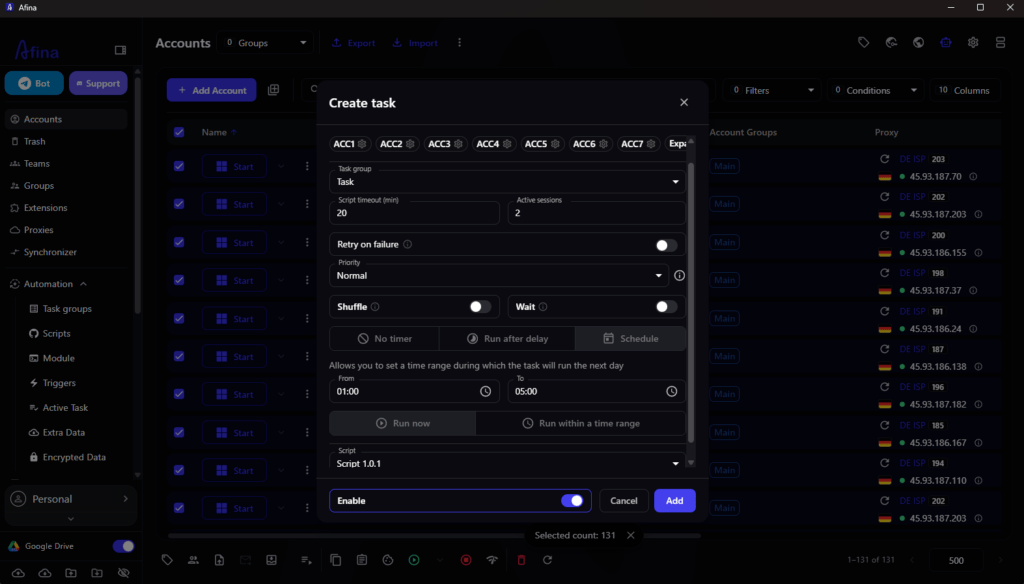
The shuffle setting isn’t cosmetic: running accounts in the same order every day is exactly the pattern antifraud systems spot without effort. Triggers run independently: a cron schedule, a set interval in seconds, or a command from a Telegram bot.
When a task is repetitive but too small to script, it’s often easier to just do it across twenty windows at once. The Synchronizer mirrors every action from the main window into all the others.
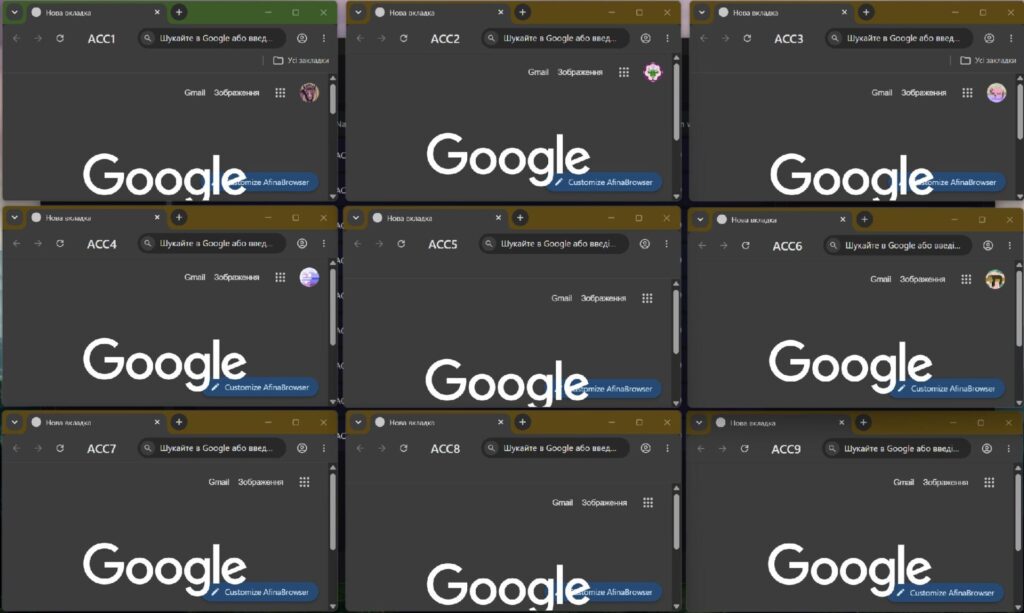
Teams get shared workspaces with permission controls: a worker can’t permanently delete a profile, handoffs go through the cloud, and profile lists sync across devices when the browser opens.
Who Saves the Most Time with Afina Browser
The biggest winners are teams running lots of similar profiles without a developer on staff. Until now, they had two options: hire out a script and wait, or click through everything by hand. An AI agent removes that fork, since a script for an unfamiliar site now gets built in a chat conversation instead of a development sprint.
How much work you hand the agent is your call. Most teams start small, with profile creation and proxy checks, then add launch scheduling. Failure troubleshooting comes last, once it’s clear the agent isn’t breaking anything it shouldn’t. One limit to keep in mind: Afina can’t guarantee an account won’t get banned. Proxy quality, your behavior in the ad account, and the platform’s own policies stay your responsibility. Automation removes the busywork and human error, not the ban risk.
Afina helps with automating profile management, but you also need the accounts you’ve built to convert. RichAds gives media buyers access to high-quality push, pop, pre-roll, Telegram, and direct-click traffic with flexible targeting and real-time optimization, so the campaigns running through your freshly warmed-up accounts perform from day one.
Pair a well-oiled account farm with a traffic source built for scale, and the busywork you’ve cut on one end stops bottlenecking your results on the other.
What is RichAds?
Ad network for telegram ads,
high quality push and popunder ads,
domain redirect, native and display traffic source,
buy push ads at $0.005 (CPC), pop ads at $0.5 (CPM),
domain ads costs start from $1.5 (CPM), native ads — from $0.001 (CPC),
ad network offers large volumes of traffic in more than 200 geos from Tier 3 to Tier 1.
Frequently Asked Questions About Afina Browser
No. You describe the task in plain language in the MCP client’s chat, and the agent breaks it into steps and calls the tools it needs. Code only comes into play through the REST API, a separate path for teams with a developer.
No. It works with metadata and names, while the actual values stay encrypted with AES-256-CBC and only get decrypted inside the script executor, right before they’re needed.
The agent looks for the element by visible text or placeholder and returns an exact selector, or reads a screenshot of the page if needed. From there, it edits the script itself and restarts only the failed tasks.
Yes. Import runs through the source browser’s local API, bringing over cookies, fingerprints, and settings. Both apps need to run on the same machine, with the source’s access key entered into Afina’s settings.



 Latest articles