



If you run offers in gray verticals, you surely know about cloaking. It allows affiliates to drive traffic on any ad platform without getting banned.
Today, we’ll introduce you to the Adspect cloaking platform. Our expert review uncovers its features, advantages, price tiers, and functionality so you can decide if it’s a good option for you.
Cloaking is one of the necessary instruments in affiliate marketing, especially when you work in Gambling, Betting, or Dating niches. The method allows affiliates to show different content to different visitors: real users see the actual offer, while ad moderators, bots, and fraud scanners see a specifically designed safe page. Most cloaking platforms have many other features to help advertisers avoid ad problems. Let’s see what Adspect has to offer.
Adspect overview
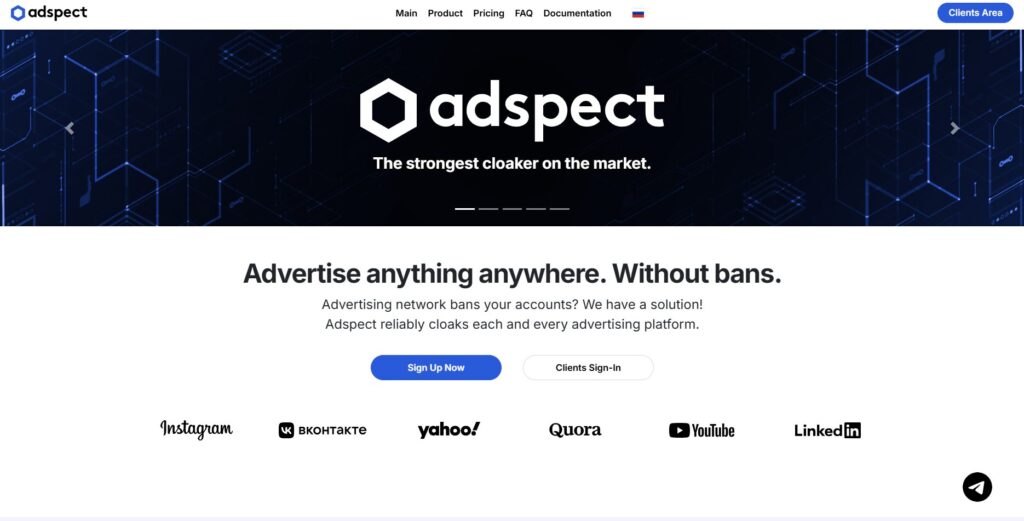
Adspect – a cloud-based cloaking and traffic filtering platform used by media buyers, affiliate marketers, webmasters, and agencies worldwide. It positions itself as an advanced enterprise-level service that helps run ad campaigns without getting banned.
The platform works with all major ad networks, including Google Ads, Facebook, TikTok, Bing, Taboola, Outbrain, MGID, and many others, and uses a combination of machine learning, fingerprint analysis, and IP filtering to differentiate real visitors from bots, manual moderation, competitors, click fraud, and antifraud scanners.
Key advantages of the Adspect cloaking service:
- Combines filtering from 12 competing cloaking tools in one platform.
- Industry-leading IP databases with billions of entries.
- The first cloaking service to offer fingerprint-based filtering via JavaScript, TCP/IP, and SSL/TLS.
- VLA™ machine learning that adapts and improves over time.
- Built-in white page generator powered by Comsign.io.
- Embedded CPA tracker with A/B testing and funnel analytics.
- Full REST API for teams that need automation.
- Support for over 40 ad platforms.
What is RichAds?
Ad network for telegram ads,
high quality push and popunder ads,
domain redirect, native and display traffic source,
buy push ads at $0.005 (CPC), pop ads at $0.5 (CPM),
domain ads costs start from $1.5 (CPM), native ads — from $0.001 (CPC),
ad network offers large volumes of traffic in more than 200 geos from Tier 3 to Tier 1.
Main features of the Adspect cloaking platform
Adspect helps advertisers ensure campaign longevity, avoid bans, detect fraud, and precisely control traffic delivery.
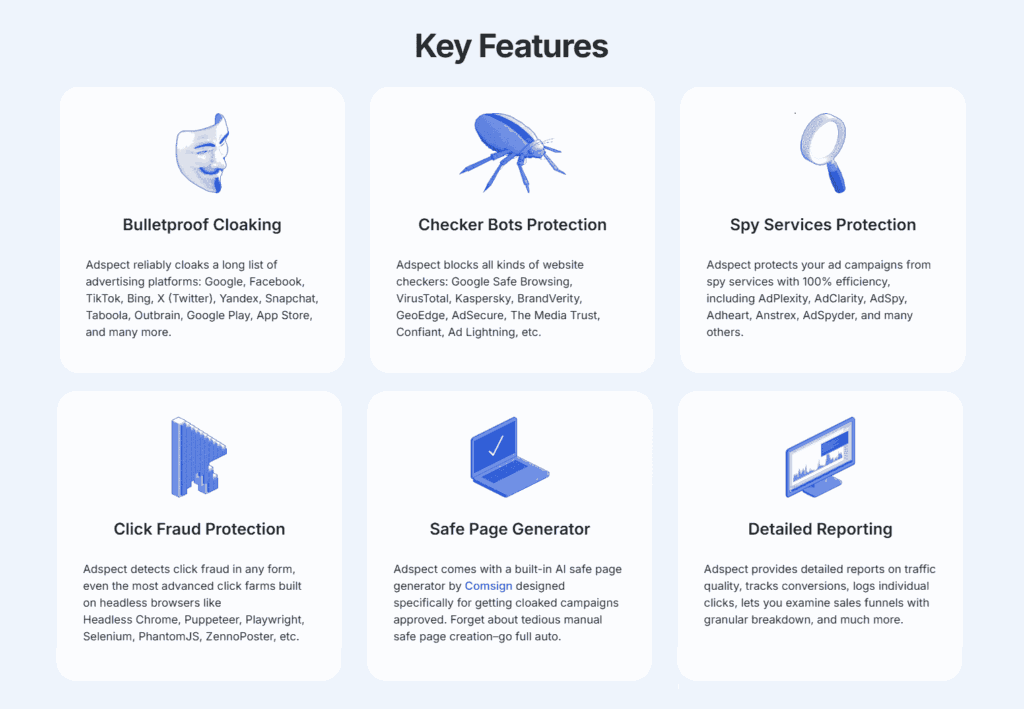
Let’s look in detail at the 8 main features you can expect on Adspect.
1. Efficient traffic filtering and cloaking
When someone clicks your ad, Adspect runs them through a series of checks to decide what page to show them. Real users land on your offer, and everyone else gets redirected to a white page. The quality and complexity of filtering affect the overall efficiency of cloaking.
Adspect analytics uses a multi-layered approach. It checks the visitor’s IP address against a massive global database of billions of known bad IPs. It also analyzes browser fingerprints, TCP/IP signatures, and SSL/TLS handshake data, technical details that help determine the visitor type precisely. These parameters are very hard to fake. Furthermore, Adspect runs checks through 12 external cloaking services simultaneously, minimizing the chance of missing anything to zero.
2. VLA™ machine learning
VLA™ (Virtual Learning Appliance) is Adspect’s built-in AI engine. It analyzes visitor behavior and fingerprints, identifies suspicious patterns, and gets smarter over time. You don’t need to update the data manually. The system adapts on its own as new threats emerge.
3. Wide platform coverage
Adspect’s primary focus is Google Ads, and it maintains a full Global Google Cache database specifically to catch Google’s moderation crawlers. But it also covers over 40 other ad platforms, including Meta, TikTok, Bing, X (Twitter), Yandex, Snap, Taboola, Outbrain, MGID, RichAds, ExoClick, and more.
4. Click fraud detection
One of Adspect’s valuable benefits is click fraud detection. The platform can automatically identify bot traffic, including sophisticated bot frameworks such as Selenium, Puppeteer, and Playwright, which are commonly used to simulate real user behavior.
Click fraud drains ad budgets on empty clicks, but it often goes unnoticed until highly abnormal data fluctuations appear. Adspect flags and blocks fraudulent clicks in real time, helping you avoid budget damage.
5. Protection from spy services
On the Professional plan, Adspect cloaking service can also determine and block ad verification tools like GeoEdge, BrandVerity, and AdSecure before they can scan your campaigns. It also blocks spy services like AdPlexity and AdSpy, so competitors can’t see your creatives or landing pages.
6. Built-in white page generator
Adspect integrates Comsign.io – a white page generator that creates compliant, convincing safe pages automatically. You pick a theme, enter some keywords, choose your domain and language, and the page is ready in under a minute. You don’t need to build white pages manually or buy them separately, which significantly simplifies and speeds up the process.
7. Embedded CPA tracker
Adspect analytics includes its own tracker, so you may not need a separate tracking tool at all. It covers click and conversion logging, funnel breakdowns, A/B testing across up to 254 landing page variants, and automatic money page rotation. Data is stored for six months on all paid plans.
8. Simple integration
Adspect supports several integration methods to fit different setups:
- direct PHP
- reverse PHP
- JavaScript
- Keitaro filter.
It’s also fully compatible with Cloudflare in proxy mode, WordPress, Shopify, Tilda, and GitHub. Teams that need automation get full REST API access on the Professional plan.
Adspect pricing plans
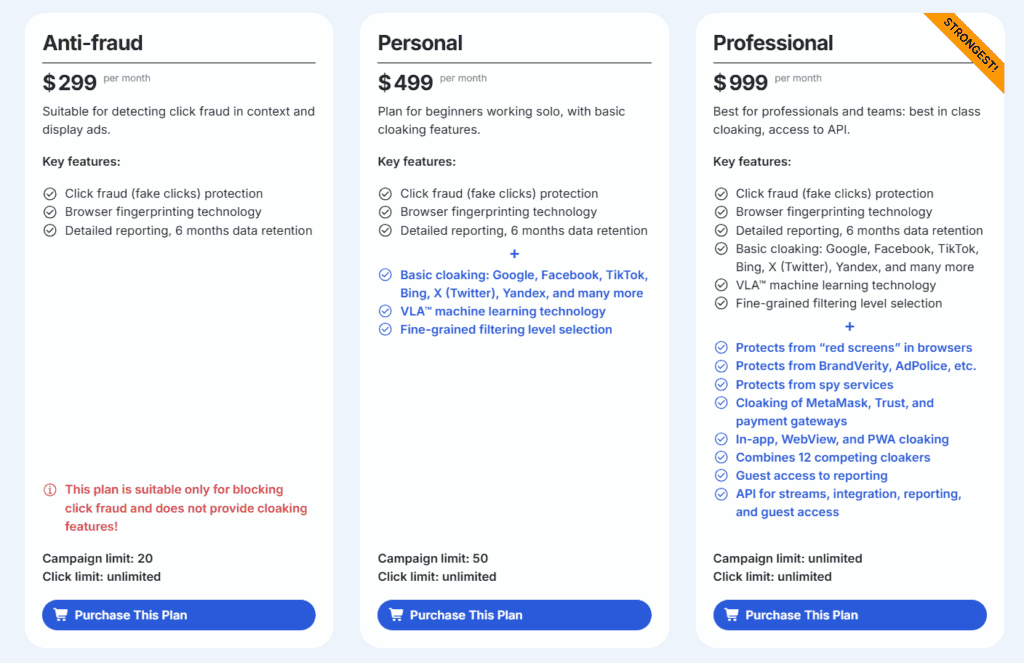
Adspect has three payment plans:
- Anti-fraud ($299/month) covers click fraud detection, browser fingerprint filtering, detailed statistics, Telegram support, and up to 20 streams with unlimited clicks. This plan does not include cloaking.
- Personal ($499/month) adds full cloaking across Google, Meta, TikTok, Bing, X, Yandex, and others, VLA™ machine learning, and adjustable filtering levels. Stream limit is 50, clicks are unlimited.
- Professional ($999/month) unlocks everything: unlimited streams, spy service blocking, ad verification service blocking, browser red screen protection, MetaMask and payment system cloaking, app/WebView/PWA cloaking, checks against all 12 partner services, guest access, and full REST API.
There are also specific discounts for multi-month payments:
- 3 months – 5% off
- 6 months – 10% off
- 9 months – 15% off
- 12 months – 20% off
Adspect doesn’t have any free plans, but it provides guest access to the Reporting dashboard, so you can take a look at what to expect inside. It also lets you try a live demo of the Comsign white page generator, which is a great opportunity to test its functionality in practice.
Note that you can only pay in alternative currency.
How to set up Adspect bot protection
Adspect is a user-friendly platform with an intuitive interface. Even without prior knowledge of affiliate marketing and cloaking, it’s easy to navigate, especially since many settings are preset to optimal levels.
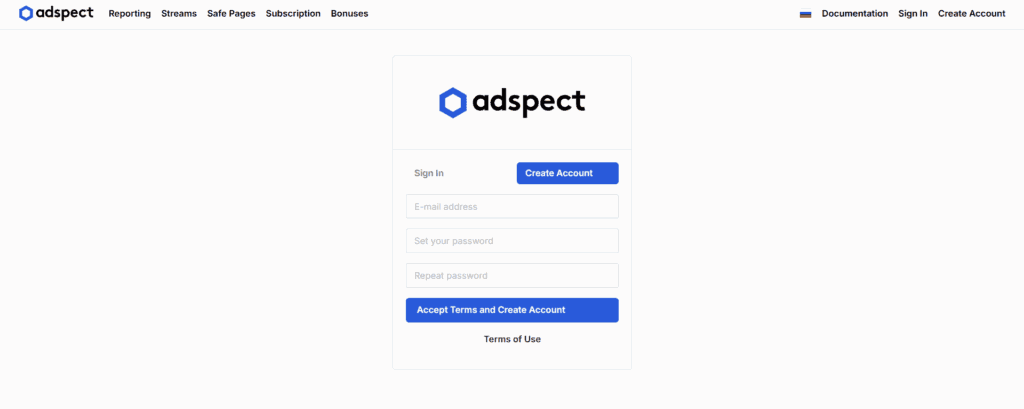
Registration
Getting started is straightforward. Go to the Adspect website and sign up providing your email address and password. Once you’re in, you’ll see a clean dashboard with all the main sections: Reporting, Streams, Safe pages, Subscription, Bonuses, Documentation.
Creating a Stream
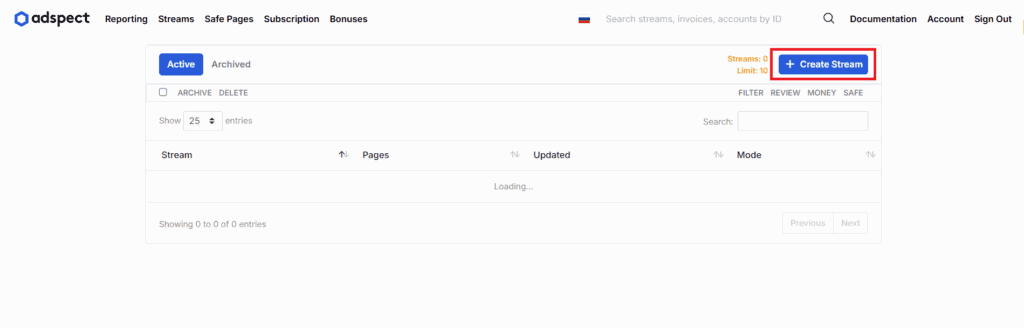
A stream is the core unit in Adspect bot protection. It’s a one traffic flow connecting your ad source to your money page and white page. Here’s how to set it up:
- Go to the “Streams” tab and click “Create Stream“.
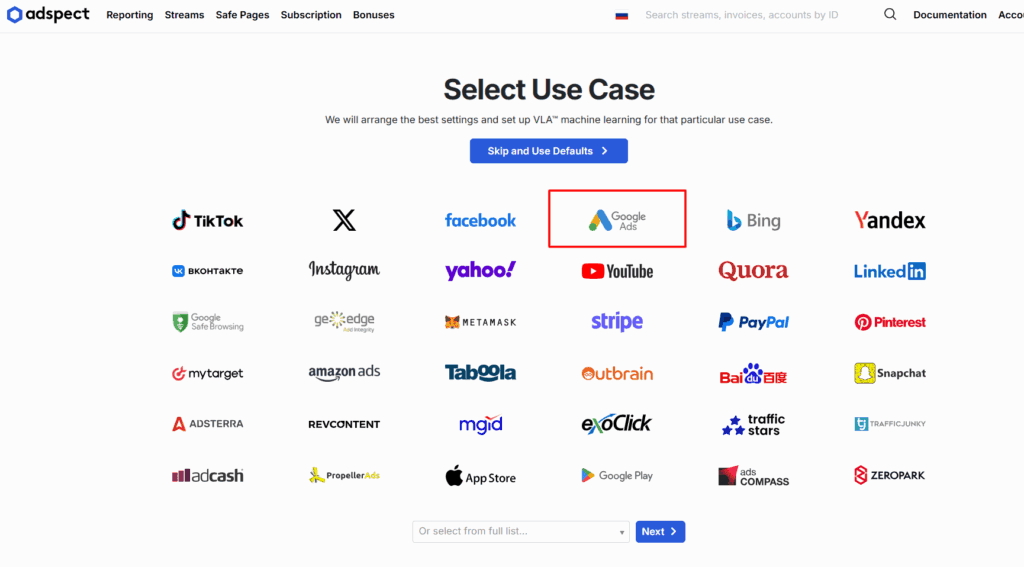
- Select your traffic source (we chose Google Ads).
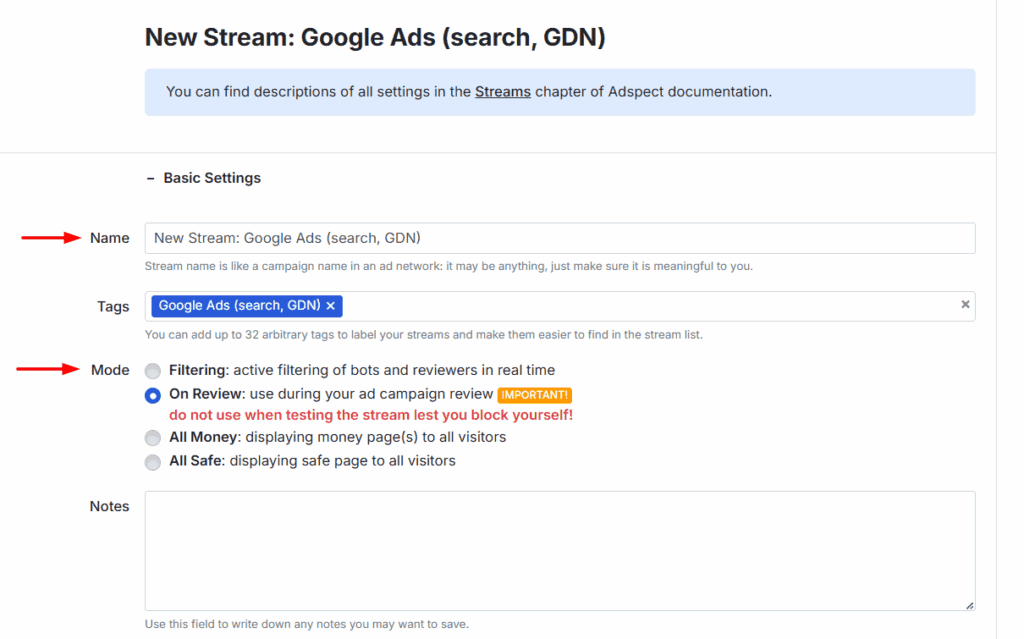
- Give your stream a name and choose a stream mode:
- Filtering: a live mode that filters traffic in real time using all Adspect technologies.
- On Review: special mode to train VLA™.
- All Money: shows the money page to everyone. It’s useful for testing.
- All Safe: always shows the white page. It’s recommended when pausing campaigns.
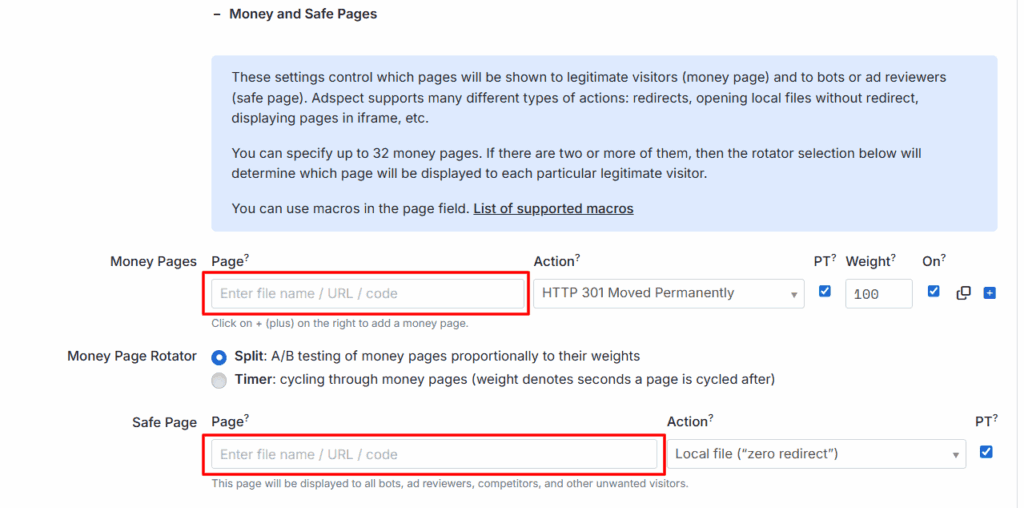
- Add your money page URL (up to 254 URLs for split testing) and your white page URL.
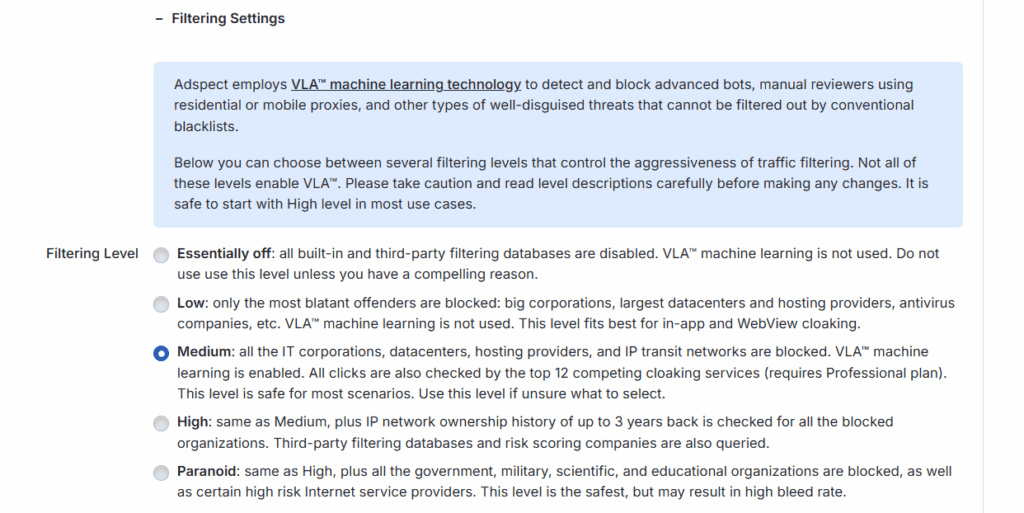
- Set your filtering level:
- Off – all filters are disabled. Use only if absolutely necessary.
- Low – blocks obvious threats like hosting providers and antivirus companies. Good for app and WebView traffic.
- Medium – the recommended default level. It enables VLA™ and checks all 12 partner services.
- High – adds historical IP checks going back three years.
- Paranoid – maximum bot protection, blocks government and academic networks too. However, it may also cut some legitimate traffic.
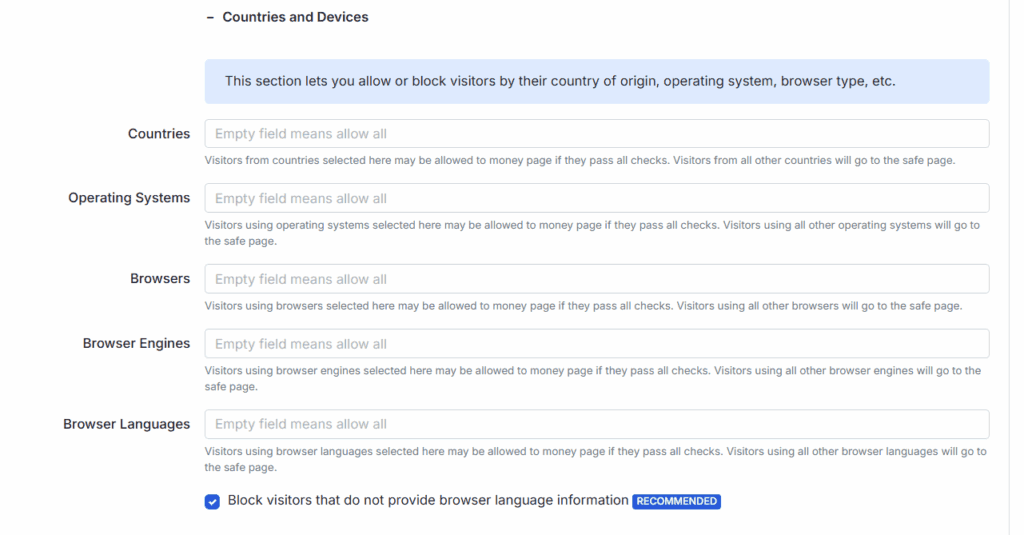
- Specify targeting by country and device.
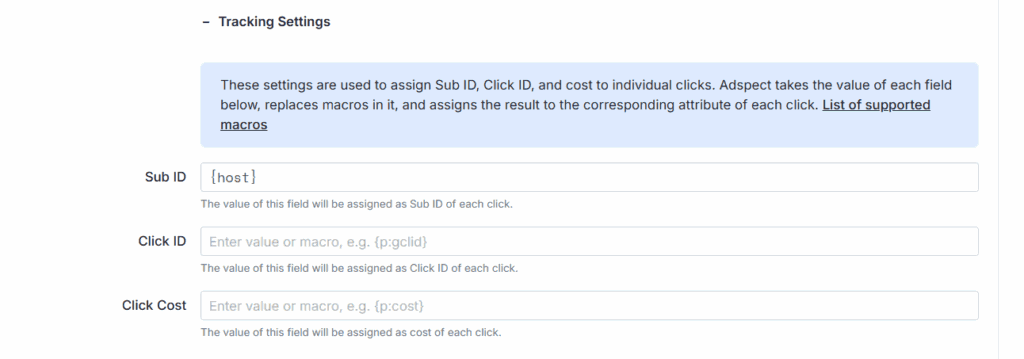
- Set up Sub ID and Click ID parameters if you’re tracking with an external tool.
- Add extra filtering rules based on IP address, user agent, referrer, or time zone if you need more control.
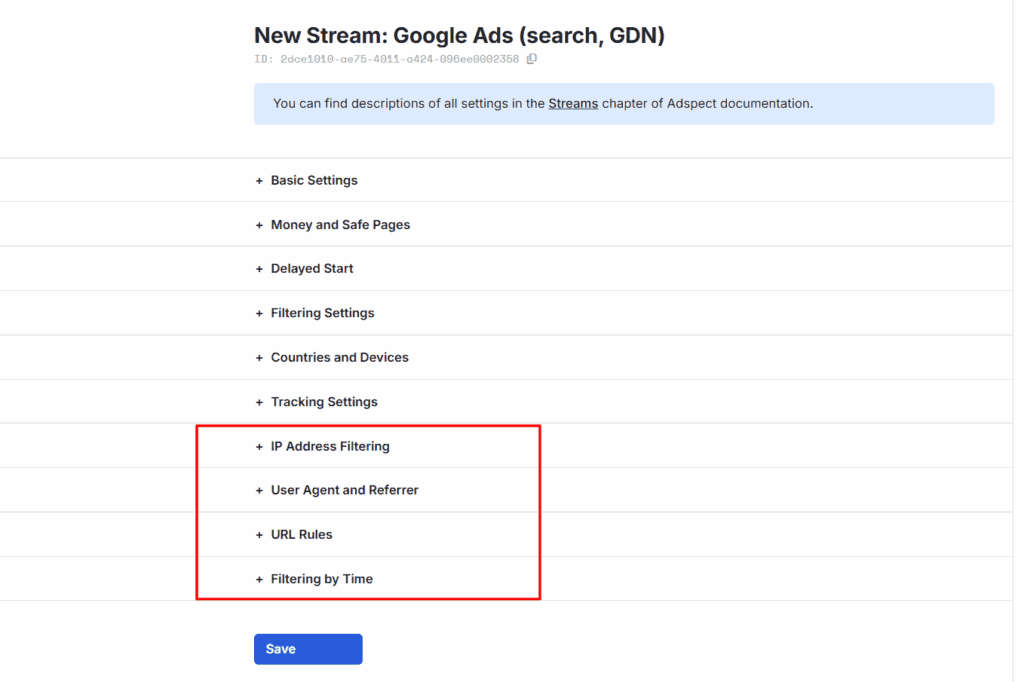
- Click “Save”.
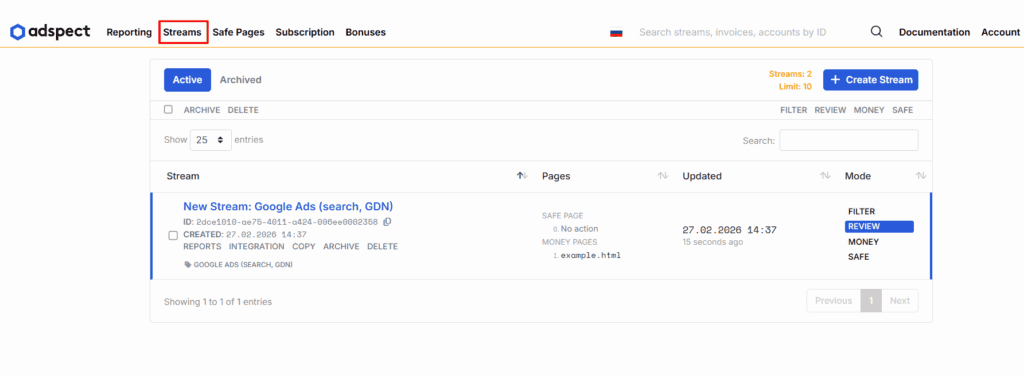
Your created stream is saved in the “Streams” tab:
White page generator
The white page generator is built into the Adspect cloaking platform and stays in the “Safe Pages” section. As we already mentioned, it is powered by Comsign.io.
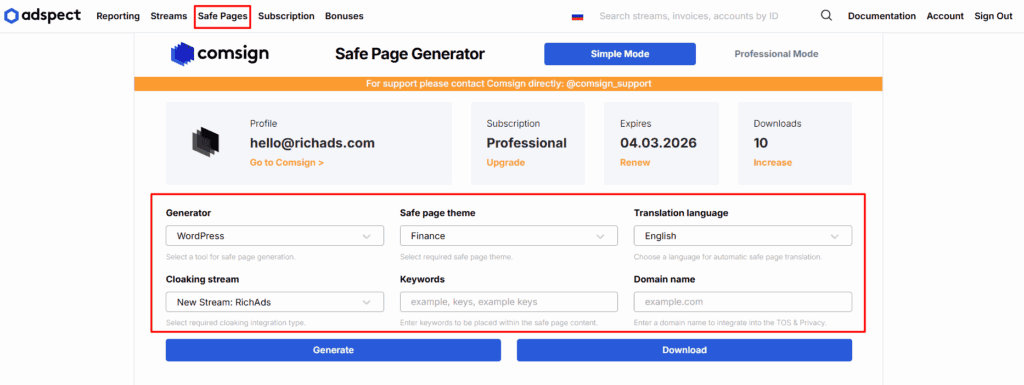
To generate the white page, you should choose the generator type (WordPress, GooglePage, ApplePage, etc.) and input the required parameters:
- a content theme relevant to your niche,
- a language if you need the page to be auto-translated,
- keywords that will be placed within the page topic,
- a domain name,
- and select the stream to integrate with.
That’s it, just click “Generate” and wait for the result.
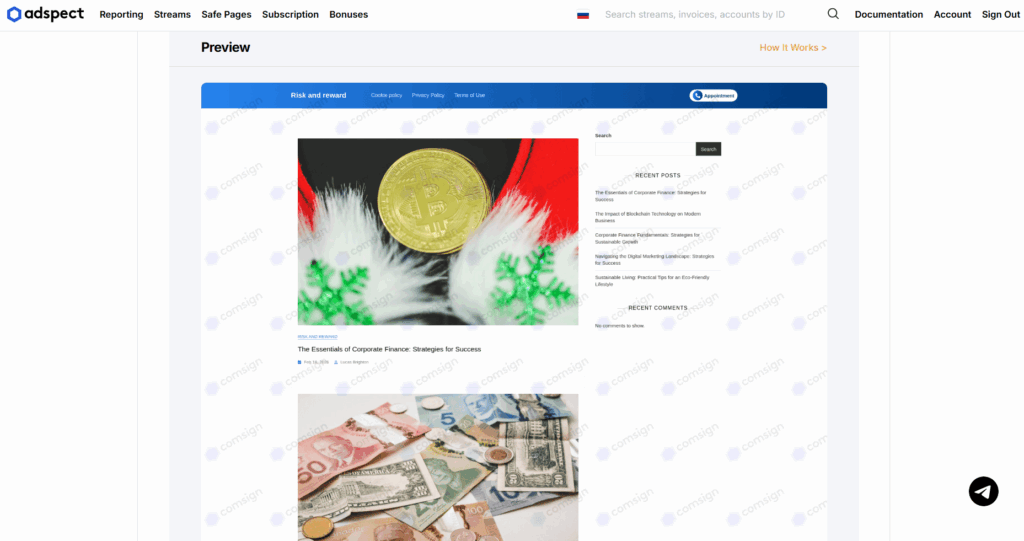
Adspect analytics dashboard
To check how your streams are performing, go to the “Reporting” section. It’s organized into three parts:
- Report parameters let you filter by date range, time zone, groupings, and funnels, so you can analyze data any way you need.
- The funnel table shows performance at each stage of the conversion flow.
- The click log provides a complete record of individual visits, including IP address, OS, country, browser, language, and more.
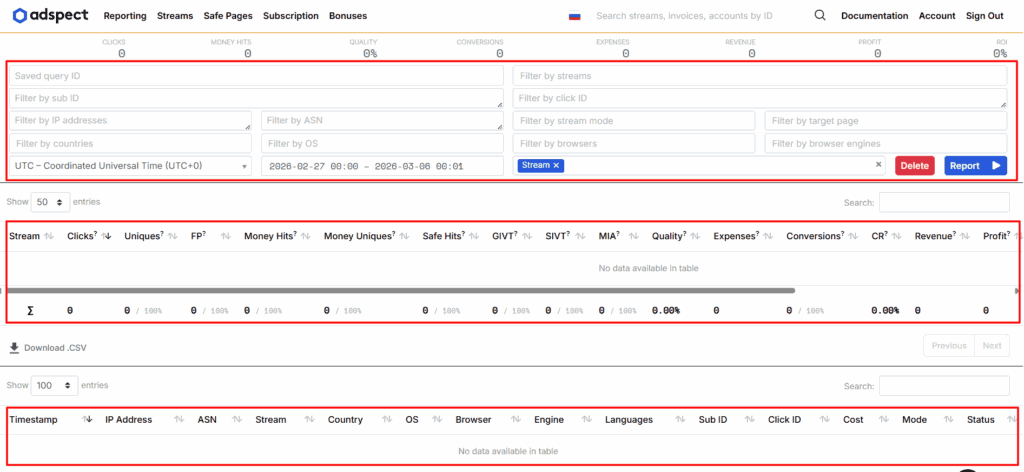
You have full control over the Adspect bot protection system and can easily spot any threats or traffic issues.
Documentation and Support
Adspect has a detailed education base covering every part of the platform. It includes a comprehensive Adspect overview, step-by-step setup guides for each integration type, cloaking strategies for major ad platforms, common troubleshooting scenarios, and best practice advice.
Even beginners can easily understand the settings and get started with the platform.
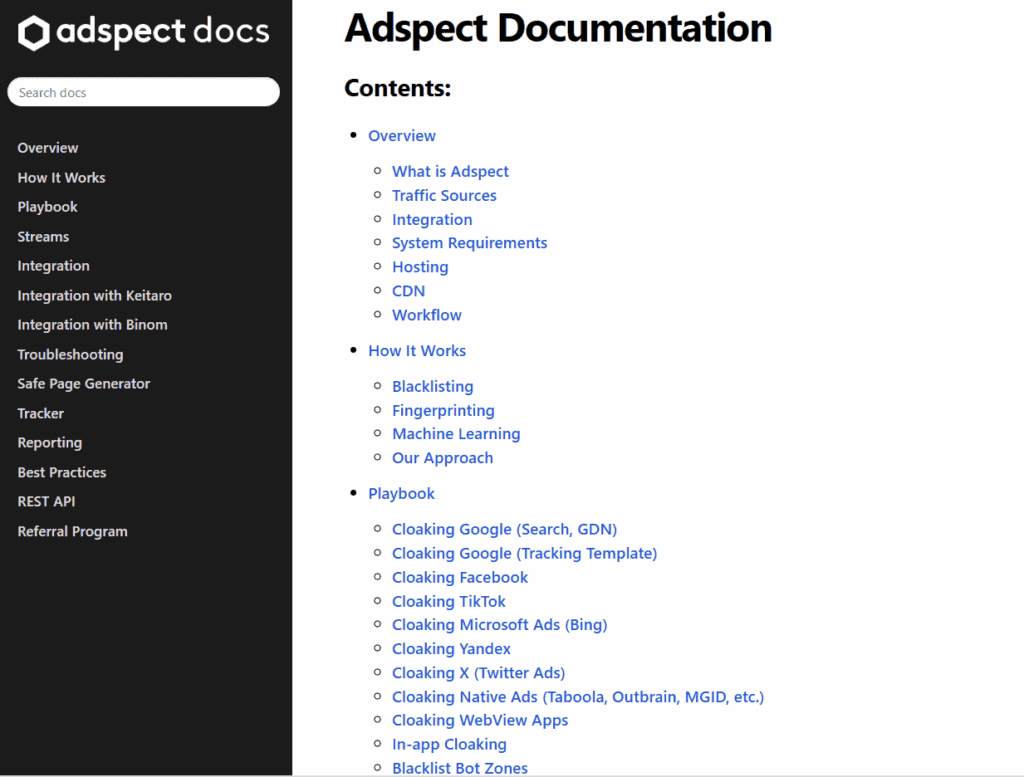
Adspect also has a skilled support team you can contact via Telegram. They know the product inside out and can help with technical questions, stream configuration, analytics, payment issues, and any other concerns.
Adspect review results
Adspect is a well-built cloaking and traffic filtering platform that goes further than most tools on the market. The combination of machine learning, fingerprint-based detection, and simultaneous checks across 12 external services creates a powerful filtering system that holds up against fraud, bots, and aggressive moderation.
The built-in white page generator and CPA tracker make Adspect a universal tool for affiliates and media buyers, eliminating the need for any additional services.
Ultimately, if bot protection and consistent traffic delivery matter to your success, Adspect is totally worth testing.
What is RichAds?
Ad network for telegram ads,
high quality push and popunder ads,
domain redirect, native and display traffic source,
buy push ads at $0.005 (CPC), pop ads at $0.5 (CPM),
domain ads costs start from $1.5 (CPM), native ads — from $0.001 (CPC),
ad network offers large volumes of traffic in more than 200 geos from Tier 3 to Tier 1.
FAQ: Adspect cloaking and filtering service
The Adspect review by the RichAds team highlights that the platform offers multi-layer traffic filtering using IP databases, browser fingerprints, and TCP/IP/SSL/TLS signatures. It also uses VLA™ machine learning for adaptive threat detection. The service supports cloaking across all major ad platforms and has a built-in white page generator via Comsign.io.
Adspect identifies moderators, bots, and verification tools by analyzing their IP addresses, browser fingerprints, and network signatures, and redirects them to a compliant white page. It simultaneously checks visitors against 12 external cloaking services and maintains billions of IP database entries to catch threats and prevent unwanted traffic.
Yes. The Adspect cloaking platform includes a built-in CPA tracker that logs clicks and conversions, breaks down performance by funnel stage, supports A/B testing across up to 254 landing page variants, and provides detailed reporting filtered by date, GEO, device, browser, and other parameters. You don’t even need an external tracker.
Adspect works with virtually all major ad networks, including Google Ads, Meta, TikTok, Bing, X (Twitter), and affiliate networks like RichAds, Adsterra, ExoClick, and MGID. However, Google Ads is the platform’s top priority, with a dedicated Global Google Cache database for maximum protection.
Yes. An Adspect overview by the RichAds team states that the service supports various integration methods, including a full REST API. It’s compatible with WordPress, Shopify, Tilda, Cloudflare in proxy mode, and GitHub.








 Latest articles






 Subscribe to our blog